Scribus is the Go-To Libre Desktop Publishing Application.
Scribus is a libre page layout program for almost every operating system
Welcome to Scribus, a page layout program for Linux, Windows, macOS, many current UNIX and *BSD systems, OS/2 Warp 4 and variants, as well as Haiku.
Since its humble beginning in the spring of 2001, Scribus has evolved into one of the premier Open Source desktop applications. Encouraged by professionals and beginners alike, the Scribus Team, with support from a large and growing number of enthusiastic contributors from all over the world, is dedicated to develop and improve “one of the most powerful and useful open-source projects out there” (TechRepublic). The leading German IT website heise.de listed Scribus as one the of the best Open Source programs available.



Say Goodbye to Microsoft Publisher. Try These 8 Alternatives Before It Disappears Next Month | PCMag
The end of Microsoft Publisher is near. I've tested the top alternatives, and here's what I recommend for both pro and beginner designers.

This is the pilot phase, with 3,000 workstations moving away from Microsoft 365. The federal administration has over 54,000 computers. //
Switzerland's military cybersecurity unit, Cyber Command, is not waiting for the civilian pilot. It is already poised to replace Microsoft 365 entirely with openDesk by October 2026.
It is pretty much the same reason. Military doesn't want foreign governments accessing sensitive Swiss data. //
Back in 2024, the EMBAG Law came into effect. It requires all Swiss federal agencies to publish government-developed software as open source by default. The law also aims to promote digital sovereignty and encourage innovation and collaboration within the public sector.
Then in December 2025, the Federal Council designated digital sovereignty as a primary focus theme. It defines digital sovereignty as "the federal government being able to fulfil its essential mission without depending on an external supplier or country."
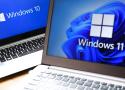
Microsoft ended official support for Windows 10 in 2025, but the company may have a harder time than expected putting the operating system out to pasture. After promising a year of optional extended update support, Microsoft has changed its policy, tacking on another year to its Extended Security Updates (ESU) program. If you are still clinging to Windows 10, you don’t have to do anything but enjoy that extra year. //
That program was set to end on October 12, 2026, but Microsoft has updated its policy with hardly a whisper, pushing back the end of extended updates to October 12, 2027. The ESU support page was updated with that date, and Microsoft’s blog post on the program has a new editor’s note confirming the change.

https://youtu.be/_AwzaZmRNsI?si=U_xxdMVhz9cFyySj
At work we triggered the update using the HKEY_LOCAL_MACHINE\SYSTEM\CurrentControlSet\Control\SecureBoot\AvailableUpdates set to 0x5944 method; and it honestly went surprisingly well. That said; it's 100% thinkpads and enterprise-line Dells here; and I have the unpleasant suspicion that the 'consumer motherboard that maybe gets an update if AGESA needs to be bumped' segment has some...under-tested DBX update functionality.
We've also had a veritable torrent of WU-delivered UEFI capsule BIOS updates go out; so the OEMs seem to be doing things on their end as well.
Luckily, to the best I've been able to pin anyone down on the question, failure to update just means not being protected according to what secure boot is designed to do, rather than the system just not booting; so we shouldn't have too large an epidemic of random home wintendos just falling over and dying; and realistically home users don't exactly //
just had to check for these in powershell:
$([System.Text.Encoding]::ASCII.GetString((Get-SecureBootUEFI dbdefault).bytes) -match 'Windows UEFI CA 2023')
and
$([System.Text.Encoding]::ASCII.GetString((Get-SecureBootUEFI db).bytes) -match 'Windows UEFI CA 2023')$([System.Text.Encoding]::ASCII.GetString((Get-SecureBootUEFI db).bytes) -match 'Windows UEFI CA 2023')
depending on which DB we have it stored (let me know if you know any other place). //
This script works pretty well if you don't know how to do it for yourself, or in your corporate environment. https://github.com/anomixer/Update-SecureBootCert
Beginning June 24, three certificates that cryptographically verify that each piece of firmware and software that loads during system boot will expire. The Microsoft-signed certificates are the linchpins of Secure Boot, a Microsoft-designed chain of trust. Secure Boot checks the digital signatures of all firmware that loads during system startup to ensure it originates from a trusted provider, such as the manufacturer of the motherboard the system runs on. //
For those of you that need to do a manual update, and you have the latest firmware, and Microsoft Security Centre states there isn't enough information to update your certificate automatically, you can go here and grab the certificates: Microsoft UEFI Guidance
https://learn.microsoft.com/en-us/windows-hardware/manufacture/desktop/windows-secure-boot-key-creation-and-management-guidance?view=windows-11#14-signature-databases-db-and-dbx
If you need a quick chart explanation of the different files, you can go Here.
https://support.microsoft.com/en-gb/topic/windows-secure-boot-certificate-expiration-and-ca-updates-7ff40d33-95dc-4c3c-8725-a9b95457578e
If you need a certificate not on the guidance page, you can go to:
Microsoft Secure Boot Open Source Repository.
https://github.com/microsoft/secureboot_objects

Microsoft knows that these are all issues because PowerToys has fixes for all of them, except they're not fixes that make it into Windows 11.
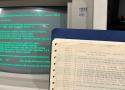
Microsoft continues to make some of the earliest chapters of its operating system history open-source and freely available. Earlier this week, it announced that Tim Paterson's DOS listings, containing source code of the 86-DOS 1.00 kernel, various PC-DOS 1.00 pre-release kernels and utilities, and the Microsoft BASIC-86 Compiler runtime library, were available on GitHub. Microsoft VP Scott Hanselman tied the release to 86-DOS 1.00’s 45th anniversary. The exec confirmed that the code, transcribed from reams of old dot matrix printouts found in a garage, was perfect, "and recompiles byte for byte to the original binaries.”

Microsoft CTO confesses that 30-year-old code from the mid-90s still forms the bedrock of Windows 11 — ancient Win32 API still the backbone, but CTO says it's 'more relevant than ever in 2026' //
As Russinovich eloquently puts it, those of us invested in the computer scene in the 90s “were thinking flying cars and moon stations by the year 2026, not Win32.” The admission that such old software tech is still the "bedrock" of Windows today may be the CTO strategically sharing a cold, hard truth, providing a 'let's be real' moment as part of Microsoft’s latest charm offensive. //
Russinovich highlights that Win32 was also the bedrock for tools like Sysmon and ZoomIt, which he actually wrote back in 1996. These tools are now “more relevant than ever in 2026,” as parts of Windows 11 and PowerToys, respectively, reckons the CTO.

AWS's destiny isn't to lose to Azure or Google. It's to win the infrastructure war and lose the relevance war. To become the next Lumen — the backbone nobody knows they're using, while the companies on top capture the margins and the mindshare.
The cables matter. But nobody's writing blog posts about them. ®

Archaeologic Microsoft veteran Raymond Chen has shared the origin story behind the Windows 3D Pipes screensaver.

Respecting users choices and offering a hardcore mode among key suggestions.
Retired Microsoft engineer Dave Plummer has waded into the argument over where Microsoft has gone wrong with Windows, suggesting that perhaps the OS needs a hardcore mode to offset some of its fluffier edges.
Plummer comes from what was arguably a golden era for the Windows operating system: the final days of Windows NT 3.5x and the advent of Windows NT 4. Although it has been decades since he was last involved in the Windows codebase, his code can likely still be found in the OS, in part, due to the blessing and curse of Windows's obsession with backward compatibility.
Plummer's complaints boil down to two main areas: a desire for a hardcore mode that optionally removes all the fluffiness added to the operating system for the benefit of non-technical users, and a combination of transparency and an end to the 'Microsoft knows best' attitude that has plagued recent releases. //
2 days
DoctorNine
Reply Icon
Re: He is so right
With Windows 10, you could mostly stop the dog chewing on itself by constructing a registry cone around its head. Windows 11 though, is M$'s latest attempt to ensure we are unable to stop it gnawing a hole in its rear end, and not only that, there are freaking cameras in the room to record us even trying to do so. I can't even. //
1 day
vtcodgerSilver badge
Reply Icon
Re: I watched the video. He's basically describing Linux.
The Windows registry would require comprehensive documentation -- which it doesn't have, has never had, and probably will never have -- to even begin to approach the utility of the Unix application specific configuration files. //
ParlezVousFranglaisSilver badge
Happy
If O/Ss were airlines - for those who've never seen it...
https://www.webaugur.com/bibliotheca/field_stock/os-airlines.html. //
https://www.oo-software.com/en/shutup10
https://github.com/Open-Shell/Open-Shell-Menu/releases/tag/v4.4.196

Historic interpreter taught millions to program on Commodore and Apple computers.
On Wednesday, Microsoft released the complete source code for Microsoft BASIC for 6502 Version 1.1, the 1978 interpreter that powered the Commodore PET, VIC-20, Commodore 64, and Apple II through custom adaptations. The company posted 6,955 lines of assembly language code to GitHub under an MIT license, allowing anyone to freely use, modify, and distribute the code that helped launch the personal computer revolution.
"Rick Weiland and I (Bill Gates) wrote the 6502 BASIC," Gates commented on the Page Table blog in 2010. "I put the WAIT command in.". //
At just 6,955 lines of assembly language—Microsoft's low-level 6502 code talked almost directly to the processor. Microsoft's BASIC squeezed remarkable functionality into minimal memory, a key achievement when RAM cost hundreds of dollars per kilobyte.
In the early personal computer space, cost was king. The MOS 6502 processor that ran this BASIC cost about $25, while competitors charged $200 for similar chips. Designer Chuck Peddle created the 6502 specifically to bring computing to the masses, and manufacturers built variations of the chip into the Atari 2600, Nintendo Entertainment System, and millions of Commodore computers. //
Why old code still matters
While modern computers can't run this 1978 assembly code directly, emulators and FPGA implementations keep the software alive for study and experimentation. The code reveals how programmers squeezed maximum functionality from minimal resources—lessons that remain relevant as developers optimize software for everything from smartwatches to spacecraft.
This kind of officially sanctioned release is important because without proper documentation and legal permission to study historical software, future generations risk losing the ability to understand how early computers worked in detail. //
the Github repository Microsoft created for 6502 BASIC includes a clever historical touch as a nod to the ancient code—the Git timestamps show commits from July 27, 1978.

Tells The Reg China's ability to p0wn Redmond's wares 'gives me a political aneurysm'
Roger Cressey served two US presidents as a senior cybersecurity and counter-terrorism advisor and currently worries he'll experience a "political aneurysm" due to Microsoft's many security messes.
In the last few weeks alone, Microsoft disclosed two major security vulnerabilities – along with news that attackers exploited one involving SharePoint as a zero-day. The second flaw, while not yet under exploitation, involves Exchange server – a favorite of both Russian and Chinese spies for years. //
"This is the latest episode of a decades-long process of Microsoft not taking security seriously. Full stop," Cressey said, acknowledging that the government continues spending billions on Microsoft products. "Anytime there's a major announcement of a Microsoft procurement by the government, the happiest people in the world first are in Redmond and second in Beijing."
Microsoft declined to comment for this story, but did point out that Google Cloud is a client of Cressey's in his consulting work.
Signing up for Microsoft's ESU program will get you one year of security updates. Look for the enrollment wizard in notifications and Settings to get started. //
Previously limited to Insiders, the program has now been opened to all individual users. "Starting today, individuals will begin to see an enrollment wizard through notifications and in Settings, making it simple to select the best option for you and enroll in ESU directly from your personal Windows 10 PC," Microsoft said in a blog post on Tuesday.

One of the changes that will be welcomed by many users, but business and enterprise users in particular, is the arrival of a new way to remove all unwanted Microsoft apps in one fell swoop. Via Group Policy, the new Remove Default Microsoft Store Packages policy helps to debloat Windows 11 in a flash. //
Currently available in the preview builds of Windows 11 on the Dev Channel, the Remove Default Microsoft Store Packages simplifies and accelerates the process. With the latest Dev build install, head to Computer Configuration > Administrative Templates > Windows Components > App Package Deployment and you’ll find a Remove Default Microsoft Store packages from the system setting. //
There is a beautifully detailed breakdown of how the policy works over on Patch My PC, where there is also the suggestion that eager tinkerers can experiment with hacking the list of supported apps. https://patchmypc.com/blog/remove-default-microsoft-store-packages/
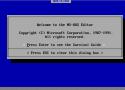
Last month, Microsoft released a modern remake of its classic MS-DOS Editor, bringing back a piece of computing history that first appeared in MS-DOS 5.0 back in 1991. The new open source tool, built with Rust and simply called "Edit," works on Windows, macOS, and—in a twist that would have seemed unlikely three decades ago—Linux. https://devblogs.microsoft.com/commandline/edit-is-now-open-source/
Aside from ease of use, Microsoft's main reason for creating the new version of Edit stems from a peculiar gap in modern Windows. "What motivated us to build Edit was the need for a default CLI text editor in 64-bit versions of Windows," writes Nguyen while referring to the command-line interface, or CLI. "32-bit versions of Windows ship with the MS-DOS editor, but 64-bit versions do not have a CLI editor installed inbox.". //
https://github.com/microsoft/edit
At 250KB, the new Edit maintains the lightweight philosophy of its predecessor while adding features the original couldn't dream of: Unicode support, regular expressions, and the ability to handle gigabyte-sized files. The original editor was limited to files smaller than 300KB depending on available conventional memory—a constraint that seems quaint in an era of terabyte storage.

Microsoft will also extend a year of additional Windows 10 security updates to any users who opt into Windows Backup, a relatively recent Windows 10 and Windows 11 app that backs up some settings and files using a Microsoft account. Users can also opt into ESU updates by spending 1,000 Microsoft Rewards points, which are handed out for everything from making purchases with your Microsoft account to doing Bing searches. //
FIxed the taskbar with Stardock's Start 11. Restored traditional right click menu with a registry entry . Now it works the way it should have been with the UI and Start Menu. //
Also, your Windows 11 taskbar is hot garbage. Fix it. If you're not sure how, Valinet's Explorer Patcher handles it pretty well; ask him.

The folder, typically c:\inetpub, reappeared on Windows systems in April as part of Microsoft's mitigation for CVE-2025-21204, an exploitable elevation-of-privileges flaw within Windows Process Activation. Rather than patching code directly, Redmond simply pre-created the folder to block a symlink attack path. //
For at least one security researcher, in this case Kevin Beaumont, the fix also presented an opportunity to hunt for more vulnerabilities. After poking around, he discovered that the workaround introduced a new flaw of its own, triggered using the mklink command with the /j parameter.
It's a simple enough function. According to Microsoft's documentation, mklink "creates a directory or file symbolic or hard link." And with the /j flag, it creates a directory junction - a type of filesystem redirect.
Beaumont demonstrated this by running: "mklink /j c:\inetpub c:\windows\system32\notepad.exe." This turned the c:\inetpub folder - precreated in Microsoft's April 2025 update to block symlink abuse - into a redirect to a system executable. When Windows Update tried to interact with the folder, it hit the wrong target, errored out, and rolled everything back.
"So you just go without security updates," he noted.
Free Blue Screens of Death for Windows 11 24H2 users
Microsoft rewards those who patch early with bricks hurled through its operating system
...
Microsoft is addressing the issue using a Known Issue Rollback (KIR), a mechanism introduced in 2021 that lets the Excel giant quietly undo borked non-security updates without user intervention.
If you're running Windows 11 24H2 on a personal or unmanaged machine, the rollback should apply automatically via Windows Update - though it might take up to 24 hours to kick in. A reboot could help your system grab the fix faster, according to Microsoft.