Links Every Kindle Owner Should Have
[This sticky thread was originally created by MR member daffy4u - who originated the idea of having a central location for Kindle users to quickly find links to useful information that could improve their Kindling experience. She encourages all MR members to contribute links that they think would be useful to other MR members, and to comment on the usefulness of these links. daffy4u and all the MR members who have contributed links to this thread have created a community of knowledge that will continue to grow as the Kindle community adds new members, and new sources of information.


Once you pay for an e-book on Amazon, it has been licensed, not sold to you, according to the company's terms of service. This gives the company a lot of leeway in deciding what you do with a purchased e-book. The terms of service explicitly forbid bypassing the DRM and reading it on devices or apps that Kindle doesn't officially support. //
The legalities involved in bypassing DRM
Bypassing DRM is illegal in the US, thanks to the DMCA (Digital Millennium Copyright Act), but it may be legal in other regions. The DMCA, among other things, makes it difficult to create a legal backup of the digital media you own. I reached out to Cory Doctorow, an author and vocal DRM critic, to learn more about this subject.
In an email, he explained the complexities involved in understanding where the boundary lies here. "It isn't a copyright infringement to move a book from one device you own to another ([aka 'format shifting']). However, in 1998, the US Congress passed the Digital Millennium Copyright Act (DMCA), which created a new kind of copyright—a copyright that protects DRM itself," Doctorow wrote. "Under Section 1201 of the DMCA, it's a felony (punishable by a [five]-year prison sentence and a [$500,000] fine) to give someone a "circumvention device" that defeats an "access control" for a copyrighted work. This law applies even if you don't violate copyright.
"Say I tell you that you have my permission to move a book I wrote (and am thus the copyright holder for) from your Kindle to another device. If the Kindle book has DRM, you're still not allowed to move it. The fact that I am the copyright holder has no impact on whether Amazon—a company that didn't create or invest in my book—can prevent you from moving that book outside of its walled garden...In fact, if I supply you with a tool to remove DRM (like some versions of Calibre), then I commit a felony and Amazon can have me sent to prison for five years for giving you a tool to move my book from the Kindle app to a rival app like Kobo," he wrote.
When you download a Kindle e-book, it's available in the AZW format, and audiobooks from Audible use the proprietary AAX format. If you download these to your computer, that is format shifting, but it may be illegal if you had to circumvent DRM to do it. Doctorow added, "that means that even though copyright law says you can format shift your books, music, videos, games, [etc.], DMCA 1201 (a "paracopyright law") makes this an imprisonable felony if you have to break DRM first." //
However, without changing the DMCA, we can't expect to see real, lasting change in this space. Doctorow said as much to me: "What we really need to do is get rid of DMCA 1201, that law that makes it a crime to format shift your media...it's the same law that stops farmers from fixing their tractors, blocks independent mechanics from fixing your car, stops rivals from setting up alternative app stores for phones and games consoles...this law is a menace!"
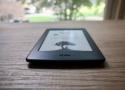
Jailbreak it, or even gut it and turn its screen into a low-power portable display with a Modos e-ink controller. //
Alternatively, WinterBreak appeared at the start of the year and supports jailbreaking even recent models of Kindle on the latest firmware.
Once the device is jailbroken, you can install your own reading or browsing software such as KOReader, allowing the Kindle to be used to read files in other formats. We did like one Hacker News commenter's single-word summary of why to do it, though: "Folders."
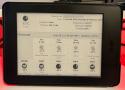
If you’ve got an old Kindle laying around, you may be interested in this write-up from [Hemant] that shows a practical example of how the popular e-reader can be pushed into service as a weather dashboard.
sscnz Seniorius Lurkius
5y
7
So I have a new Kobo since last year, but I also have a fairly new Kindle Paperwhite and then then we have a few more Kindles in the family. So here's what I did which allows me to read all books across all devices with progress sync and the ability to push books down to a device from Calibre.
- Jailbreak all Kindles using Winterbreak (works on latest firmware and will then disable future automatic updates from Amazon).
- Download all purchased books from Amazon, import into Calibre which will do its DRM thing on import.
- Install KOReader across all devices, enable progress sync and Calibre integration. Only works on jailbroken kindle devices but will install in seconds using a script on Kobo.
I can pick up my Kobo in my office, read a few pages, then before going to bed, pick up my Kindle on my bedside table and continue the same book where I left off.
Starting Feb. 26, 2025 (via ZDNet) you will no longer be able to download copies of your Kindle books and use those files as a backup. After that date, you will only be able to download books via Wi-Fi or through the Amazon platforms. //
All in all it is a reminder that you don't actually own many or most of your digital purchases, as what you are typically actually "buying" are licenses to use content that can be revoked at any time.
On the first day of the new year, HackerDude released WinterBreak, a Kindle jailbreak that will work on any model of Kindle released since 2013’s Paperwhite 2 and with any current firmware (via Notebookcheck). There are other jailbreaks available, but they only work with older firmware. This is the first jailbreak that will work with the latest generation of Kindles.
After all, all devices have their dangers. The discovery of speech introduced communication – and lies.
- Isaac Asimov
WinterBreak is a jailbreak which was released on New Year’s Day 2025 by HackerDude
It is based on Mesquito
Kindle
Your Notes and Highlights
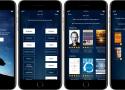
A couple of years ago, Amazon removed the ability to purchase e-books with their flagship Kindle for Android from the Google Play Store. Google implemented a policy that all in-app purchases had to be made using their billing system. Instead of paying Google 30% of each e-book sold, Amazon removed the ability to buy e-books or audiobooks. //
Amazon operates their own Android App store. You can install the Amazon App Store and download the Kindle app if you have a smartphone or tablet. All of the audiobooks and e-books that are available in the store can be purchased. This is because Amazon uses their billing system, the same one that their Kindle e-readers use.
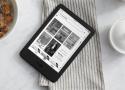
The Amazon Kindle has lost its edge in the past few years. Instead of innovating, they issue minor incremental updates through an unnecessary amount of generations, which are currently at 11. They have a tremendous lack of features that are missing at an inherent level, like expandable storage or even speakers. Amazon disregards trying new things like colour e-paper, offering different speed modes, or even physical buttons. If you weigh the Kindle line against any other device in the respective screen sizes class, there’s virtually no reason to purchase Kindle e-readers anymore. ///
The comments appear to strongly disagree... Do one thing and do it well is a winning formula!
If the latest software doesn't download automatically to your device, update it manually by connecting your device to a computer.
Transfer a file:
- Using a computer, download the file for your Kindle from Kindle E-Reader Software Updates.
- Turn on your Kindle.
Connect your Kindle to your computer using the included charging cable. - Drag and drop the downloaded file from your computer onto the "Kindle" drive.
- After the file has transferred successfully, eject the Kindle to disconnect your Kindle from your computer safely.
- Note: For Kindle Scribe, use the Disconnect option displayed on screen.
- Disconnect the charging cable from your Kindle and your computer.
- On your Kindle home screen, tap the Menu icon, and then tap Settings.
- Tap the Menu icon again, and then tap Update Your Kindle.
- Tap OK to perform the update.
- The message Your Kindle is Updating appears.
After the update is complete, your Kindle automatically restarts. Plug your Kindle in to charge and let it sit overnight allowing your books to index.
Software updates automatically download and install on your Kindle when connected wirelessly. These free software updates include general improvements and performance enhancements.
Enter the security code at the end of your account password and click Submit. For example, if password is "abcdef" and the security code received is "12345," enter "abcdef12345" as your password.
So you bought a new Kindle and you are ready to start reading! One of the first things that you may want to do is register your Kindle to your Amazon account, and sync your device with your library. This will allow you to access all your Kindle books.
But, sometimes, that is easier said than done. No technology is fool-proof and chances are some of you may not be able to register a Kindle to your account! (as much as I hope that is not the case!)
This wikiHow teaches you how to use a Kindle Paperwhite eBook reader. The Kindle Paperwhite is a tablet-like item on which you can read eBooks borrowed or purchased on Amazon.
Kindle E-Reader User and Quick Start Guides
Watch help videos to learn how to setup, use and fix issues on a Kindle E-Reader.
Review distinguishing features to help determine which device you have.
Select devices display the device name in the Settings.
- From anywhere, swipe down from the top and select All Settings.
- Go to Device Options and select Device Info.
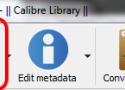
At some point you will run into the situation where you have transferred an ebook in .mobi format to your Kindle Fire and it is displayed as a document instead of a book. This creates an inconvenience since now your books are in two locations instead of just one. Here is how to make your .mobi files be registered as books on the device.
The issue that is causing the device to register your .mobi file as a document rather than a book is that there was a personal doc tag (PDOC) placed in the .mobi file during conversion. This tag needs to be removed by reconverting the book without the problematic PDOC.
Open calibre, click preferences, second row down (conversion), click output options. in the list on the left select mobi output. delete anything in the "personal doc tag" and leave it empty. click apply then close prefernces and close and restart calibre. now when you send book to device, they should show up in the Books category on your kindle.