
Important -- It's heavily recommended to activate HTTPS before enabling this feature, to avoid possible MITM attacks.
The Vaultwarden Admin panel allows a server administrator to configure Vaultwarden, view all the registered users and organizations and also to delete them. It allows inviting new users even when registration has been disabled. And it provides a diagnostics page in which you can generate the Support String.


Get started with Bitwarden through bite-sized courses. Whether you're deploying Bitwarden to your entire organization, setting it up for your family, or just getting started as an individual, these courses have you covered.

Vaultwarden is a lightweight, open-source reimplementation of the Bitwarden server written in Rust. It is fully compatible with all official Bitwarden clients (browser extensions, desktop apps, iOS, Android) and runs on hardware as modest as a Raspberry Pi using under 50 MB of RAM. This guide covers everything: what Vaultwarden is and how it compares to Bitwarden and 1Password, Docker installation, why HTTPS is mandatory and how to solve it without a domain using Localtonet, the correct way to generate the ADMIN_TOKEN with Argon2, how to disable open registration, connecting Bitwarden clients, a complete backup strategy, Fail2Ban brute-force protection, and a dedicated Raspberry Pi section.
Browser extension
- Edit the vault item for which you want to generate TOTPs.
- Select TOTP, which will scan the authenticator QR code from the current webpage. The full QR code must be visible on-screen.
Browser extension TOTP scan - Tap Save once the code has been entered to begin generating TOTPs.
Bridge to Windows OpenSSH agent from Pageant. This means the openssh agent has the keys and this proxies pageant requests to it.
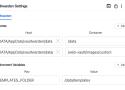
So either use auth-anon-layout > main a > bit-icon or auth-anon-layout > main > div > a > bit-icon.

Since version v1.33.0 you can modify the CSS which Vaultwarden previously embedded in the web-vault.
This way it makes it more easier for users to tweak the style and layout or even hide items.
To modify the CSS you need to add a templates directory in your data directory, or provide the correct path via the TEMPLATES_FOLDER environment variable.
Within this directory you need to create another directory called scss which will hold the file(s) for modifying the stylesheet Vaultwarden will serve.
A password manager is great for remembering all your logins, but you still need to keep track of the details for logging into that password manager! Some items to keep tabs on include the account email address, master password, two-step login (2FA) details, recovery codes, and more. vaultwarden
Host your own password manager, Vaultwarden, securely and efficiently. Install Vaultwarden as a Docker container and secure it with Fail2Ban.
some sysadmin • March 9, 2026 2:55 PM
Different tools for different use-cases. My org self-hosts a vaultwarden instance with account recovery auto-enabled. If our admin accounts were to be compromised, it’d be game over for the whole org. (well, provided our SIEM also failed at alerting us that multiple vault recoveries were taking place in a short amount of time)
As a sysadmin responsible for a 300-ish users network I simply cannot afford to have a password manager that does not have central management and most importantly an account recovery feature in case of forgotten passwords.
Our initial rollout was KeepassXC on test users (30 people) and a fourth of them forgot the master password within 2 weeks. At this point I’m either taking a central vault with potential backdoors or I’m ok with letting users store their passwords in a plain text .docx.
In private though KeepassXC all the way.
The Bitwarden vision is to imagine a world where no one gets hacked. We carry this forward in our mission to help individuals and companies manage their sensitive information easily and securely. Bitwarden believes that:
Basic password management for individuals can and should be free. We provide just that, a basic free account for individuals.
Individuals and families should take an active role in their security using TOTPs, emergency access, and other supporting security features.
Organizations can greatly improve their security profile through organizational password management and secure sharing.

Clone the item back to your individual vault by using the Options menu to select Clone. This can be done from the Admin Console or, if you are an Owner, Admin, or have Manage collection access to the collection the item is kept in, it can also be done from your Vaults view.
Delete the item from the organization vault by selecting Delete from the Options menu.
This guide covers the Bitwarden approach to onboarding and succession planning for members of your organization, starting with our approach to the relationship between members and organizations, then covering the simplest use-cases for onboarding and succession, and finally and moving on to the levers and options at your disposal to fit Bitwarden to your needs.
Store and sync passkeys in Bitwarden
To log into websites and other apps, store your passkeys in your secure Bitwarden vault, which gets synced anywhere you go. https://vimeo.com/880292801?fl=pl&fe=vl
Also available in beta, Windows 11 integrates with the Bitwarden desktop app to store and use passkeys natively with other applications.
Securely access your vault with a passkey
Use a passkey to sign into the Bitwarden web app and browser extension to streamline authentication, while using WebAuthn PRF passkey technology for secure vault encryption.
https://player.vimeo.com/video/887354174?h=87c13cfdeb
So, are passkeys shareable? The short answer is yes, when managed properly. Read on to learn more about passkeys, how they differ from passwords, and how teams and families can share passkeys without compromising security.
The Bitwarden web app provides the richest Bitwarden experience for personal users and organizations. Many important functions such as setting up two-step login or administering an organization must be done from the web app.
This article describes how to format .csv and .json files for importing into Bitwarden. The formats are identical to Bitwarden vault exports. To select a file type and format, determine the destination vault and which item types you need to import:
Format your file based on whether you're importing to an individual or organization vault.
Bitwarden .csv files only include logins and secure notes. If you need to also handle identities and cards, use a .json file.

As a benefit to employees, Enterprise organizations can offer sponsorships for free Families organizations. Sponsored families organizations allow users to securely share personal credentials with up to five family members or friends, encouraging good security habits at home as well as at work.
Contrary to what password managers say, a server compromise can mean game over.