Default date in form
^  #  ^  Date of check  ^  User Name  ^ Description  ^
<pagemod custom_check _before>| @@auto_inc@@| @@Date of check|@@today@@@@ | @@meta.user.name@@ |@@Check Description@@  |
</pagemod>

<form>
action pagemod _self custom_check

fieldset "New Entry"
textbox  "Check Description" ^
hiddenautoinc "auto_inc"
hidden   "today" "=%Y-%m-%d"

yesno    "Need to enter your own date?"

fieldset "Enter your date" "Need to enter your own date?"
date     "Date of check"

fieldset "√"
submit   "√ Submit"
</form>

One of the reoccurring questions I hear from new DokuWiki users again and again is "How do I add some automatic navigation?" //
Fixed Navigation
I believe, for a new wiki, you're better off with no automatic navigation at all. In fact it may be counterproductive to the nature of a wiki.
The beauty of a wiki is the interconnection of the various topics. Linking might be the main property of a wiki. //
Here's how you do it. You simply create a page named "sidebar" and put a list of links in it. Of course you can also use headlines or other formatting to make it more accessible. You can influence the order of your links by reordering your list and of course you can give each link an individual name. It's all standard wiki syntax. No magic and all under your control. //
A somewhat better approach would be the navi plugin. It it allows you maintain a central list of links (using the standard list and link syntax). It outputs that list's sub lists collapsed or opened based on what page you're currently on.
You still fully control the order and titles of your links and it's still very wiki like.
The Template Approach
An alternative approach to make the navigation a bit more dynamic while maintaining full control over its content is to use a template that offers some more sophisticated navigation mechanisms.
One example would be the sprintdoc template. Again, the navigation is created using a sidebar page as described in the fixed approach above. This time however, headlines in the sidebar are treated special and automatically create collapsible sections. It even lets you add icons to make the sections more recognizable. //
Automated Listings
So what if you really need an automatic list of pages in a namespace? I would recommend looking at the simplenavi plugin. As the name suggests, it's really simple. It creates a nested list of links to the pages it found.
I would recommend not using it as the main navigation, but to combine it with the fixed navigation approach and only use it in the sidebar of deeper namespaces.
Alternatively the nslist plugin is a good way to add list of sub pages in the current namespace. This could be used to create automatic indexes on a namespace start page.

This is a simple Apache setup to fight excessive bot traffic. The idea is simple: if a request is made without a proper cookie, present a simple page with a button. When the button is clicked, the cookie is set and future requests are allowed through. Legitimate users will click the button, while most bots will not.
Unlike other, similar solutions this one is designed to be easy to deploy and setup with an existing Apache server without the need of a reverse proxy or complex dependencies. Also unlike many other solutions it also optionally works with JavaScript disabled.
The handling is mostly done by mod_rewrite and a small Go helper program that performs fast lookups against multiple allow lists.
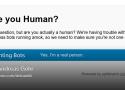
So taking a page out of Anubis' book, I went and implemented my own little bot blocker. The idea is pretty simple. Each request gets checked for the presence of a cookie. If the cookie is set, the request is served as usual. If the cookie is missing, a simple HTML page with a button is shown. Real users are asked to click the button, get a cookie valid for 30 days and the page reloads, this time serving the original request. From then on they can browse the site as usual. But since bots don't click buttons (yet), they are stuck at the button page forever.
I was able to implement this whole mechanism with Apache's mod_rewrite module, which means no additional service (like Anubis) is needed. Each request is checked by Apache and since the bot check page is static, nearly no resources are needed.
It works really well. Can you spot when the system went online in the graph below?
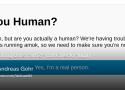
After my last post about fighting bots, I received several questions asking whether my solution would also work for simple web hosting setups. Unfortunately, that’s not the case. Even though most hosters use Apache and allow the use of mod_rewrite, they typically only permit configuration through .htaccess files. The problem is that the RewriteMap configuration my solution relies on cannot be defined there.
So I started thinking: what if we use PHP instead?
Ideally, we wouldn’t want bots to reach the PHP interpreter at all. But if we have no other choice, we can still make this fairly efficient by blocking bots very early—before the DokuWiki core is even initialized.
This is where the new Bot Check plugin comes in.
The idea is simple: the plugin generates a small, dependency-free PHP script that implements the bot checks. This script is then loaded via DokuWiki’s inc/preload.php mechanism, ensuring it runs as early as possible in the request lifecycle.
For end users, the experience is the same as for my previous solution. A quick button click sets a cookie and let's them access your wiki for 30 days.
his is a somewhat recycled version of a forum post that I have to lookup again and again, because the same similar questions keep popping up:
How can I install DokuWiki on a shared drive?
How to run DokuWiki out of Dropbox and share it with multiple users?
How to sync DokuWiki between different computers?
These questions mostly come from users who made their first steps in DokuWiki using the "DokuWiki on a Stick" version. To novice users, the stick version feels like a traditional desktop application: you double click the run.cmd and DokuWiki starts.
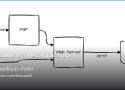
But what is really starting is a local web server and a browser pointing to said web server.
Default export formats
The following export options are available by default:
export_raw
Returns the page's source as text/plain
Example: https://www.dokuwiki.org/export?do=export_rawexport_xhtml
Returns the rendered page as simple XHTML without any navigational elements
Example: https://www.dokuwiki.org/export?do=export_xhtmlexport_xhtmlbody
Returns the rendered XHTML of the page only.
No head or body tags are added. No contenttype headers are sent.
Useful to include the rendered output into some other website
Example: https://www.dokuwiki.org/export?do=export_xhtmlbody
fortunately, i made a discovery: the “detail” page is called “detail.php”, while the normal “get me the whole image” link is “fetch.php”. so i simply deleted detail.php and symlinked the name to fetch.php; this fixed it, and i didn't even have to edit any code, because doku is built the way it should be: a loose collection of files that anyone can understand.
this is, again, why i went with dokuwiki - because it's one of the last vestiges of classic nerd software on the internet. it's like linux in 2003, before it started trying to Help you, before it started trying to be a mishmash of half-baked, half-remembered ideas from Windows and MacOS that don't make end users all that much more comfortable, while getting in the way of the people who the OS was meant to be for in the first place. just let me ifconfig an IP onto eth0 you jackoffs, stop Managing my Network.
i hate modern linux. it has been going in the wrong direction for over 20 years, trying desperately to suck up to consumers who will never care about it, like the democrats “reaching across the aisle” to people who simply bite their fingers off for their trouble, while doing immense harm to their own constituents in the process. and that's really a microcosm of all free software, it's why every other open source CMS package reeks of business-brain.
enterprise brainworms have taken over so fully that you just can't find something at the triple point of “good idea”, “well maintained” and “actually useful for normal human beings,” which is, again, how i wound up using a piece of software from 2004, before the collapse began in earnest. it's like finding steel that isn't radioactive due to fallout from nuclear tests: you simply have to go dig up the old stuff, even if that means melting down old car chassis.
i want that registered user can see DIFF button and everything, and non-registered can show only 'recent changes', so my wish is to have a DISABLEACTION function managed by a sort of ACL.
A simple way to solve this problew is it that follow.
in /incl/template.php, change:
case 'diff':
 html_diff();
    break;
with:
 case 'diff':
    if ($_SERVER['REMOTE_USER'])
    {
        $first = is_numeric($_REQUEST['first']) ? intval($_REQUEST['first']) : 0;
        html_diff($first);
    }
    else
        html_login();
    break;
in this way, if you are a logged-in user, you can display the DIFFERENCE section, with code confront.
if you are not logged, it displays a form for login.
This document describes the steps needed to integrate DokuWiki with Mantis. The method described here was originally tested with mantis version 1.1.0rc2 and dokuwiki rc2009-12-02, and should work with subsequent versions (modulo bugs). It may work with older versions of mantis provided you make the File Changes described below.
template Simple and lightweight, but modernized version of the default template
Dokuwiki white template installation
all the tags from https://b.plas.ml
1st-amendment 2nd-amendment 4th-amendment 5th-amendment 9/11 a8 abortion acl adhd afghanistan africa a/i air-conditioning amateur-radio amazon america american android animals anti-americanism antifa anti-semitism antiv antivirus aoip apollo apple appliances archaeology architecture archive art astronomy audio automation avatar aviation backup bash batteries belleville bible biden bill-of-rights biology bookmarks books borg bush business calibre camping capitalism cellphone censorship chemistry children china christianity church cia clinton cloud coldwar communication communist composed computers congress conservatives constitution construction cooking copyleft copyright corruption cosmology counseling creation crime cron crypto culture culture-of-death cummins data database ddt dd-wrt defense democrats depression desantis development diagrams diamonds disinformation diy dns documentation dokuwiki domains dprk drm drm-tpm drugs dvd dysautonomia earth ebay ebola ebook economics education efficiency electricity electronics elements elwa email energy engineering english environment environmentalism epa ethernet ethics europe euthanasia evolution faa facebook family fbi fcc feminism finance firewall flightsim flowers fonts français france fraud freebsd free-speech fun games gardening genealogy generation generators geography geology gifts git global-warming google gop government gpl gps graphics green-energy grounding hdd-test healthcare help history hollywood homeschool hormones hosting houses hp html humor hunting hvac hymns hyper-v imap immigration india infosec infotech insects instruments interesting internet investing ip-addressing iran iraq irs islam israel itec j6 journalism jumpcloud justice kindle kodi language ldap leadership leftist leftists legal lego lgbt liberia liberty linguistics linux literature locks make malaria malware management maps markdown marriage mars math media medical meshcentral metatek metric microbit microsoft mikrotik military minecraft minidisc missions moon morality mothers motorola movies mp3 museum music mythtv names nasa nature navigation navy network news nextcloud ntp nuclear obama ocean omega opensource organizing ortlip osmc oxygen paint palemoon paper parents passwords patents patriotism pdf petroleum pets pews photography photo-mgmt physics piano picasa plesk podcast poetry police politics pollution pornography pots prayer pregnancy presentations press printers privacy programming progressive progressives prolife psychology purchasing python quotes rabbits rabies racism radiation radio railroad reagan recipes recording recycling reference regulations religion renewables republicans resume riots rockets r-pi russia russiagate safety samba satellites sbe science sci-fi scotus secularism security servers shipping ships shooting shortwave signal sjw slavery sleep snakes socialism social-media software solar space spacex spam spf spideroak sports ssh statistics steampowered streaming supplement surveillance sync tarsnap taxes tck tds technology telephones television terrorism tesla theology thorium thumbnail thunderbird time tls tools toyota trains transformers travel trump tsa twitter typography ukraine unions united.nations unix ups usa vaccinations vangelis vehicles veracrypt video virtualbox virus vitamin vivaldi vlc voting vpn w3w war water weather web whatsapp who wifi wikipedia windows wordpress wuflu ww2 xigmanas xkcd youtube zfs