The Xteink X3 eReader
Xteink X3
$69


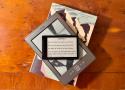
The Xteink X3 has changed my opinion of what an eReader should be. It doesn't need to be the same size as a paperback, and it definitely doesn't need to be made by Amazon.
Xteink X3
$69
Save $10
https://www.xteink.com/products/xteink-x3
Are you tired of renting digital books from tech giants who change the rules whenever they like? Building a personal library takes some effort, but owning your files feels right. Here are the best websites where you can buy modern DRM-free ebooks and keep them on your drive.
- https://www.smashwords.com/
- https://www.ebooks.com/
- https://www.humblebundle.com/books
- https://uk.bookshop.org/
- https://www.fanatical.com/en/bundle/books
- https://www.baen.com/
- https://leanpub.com/
- https://storybundle.com/
- https://nostarch.com/
- https://www.versobooks.com/
- https://www.sevenstories.com/
- https://weightlessbooks.com/
- https://belial.fr/
- https://www.7switch.com/
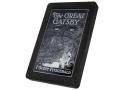
Open Book Touch
A pocketable, front-lit, open source e-reader — for every book, in every language //
Open Book Touch
Open Book Touch e-book reader with included LiPo battery and MicroSD card
$149 Free US Shipping / $12 Worldwide
Orders placed now ship Apr 21, 2027.

Digital books have grown in popularity over the past decade, but more Americans still read books in print than in digital formats.
Overall, 75% of U.S. adults say they have read all or part of at least one book in the past 12 months, according to a Pew Research Center survey conducted in October 2025. While book reading is widespread, the survey also shows that participation in book clubs is much less common.
Print continues to be the only book format used by a majority of Americans. Roughly two-thirds of adults say they have read a physical book in the past 12 months, according to our October survey.
Much smaller shares say they have read an e-book or listened to an audiobook in the past year
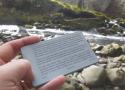
The Xteink X4 is a tiny eink ereader which is pretty affordable, and definitely very pocketable. At around £44 from Aliexpress I took the plunge.
One big plus that I had read about was that there are actively developed open source firmwares available for this device, most notably Crosspoint Reader. The supplied firmwares are pretty naff and also mine and most of these come out of the box setup with Chinese localisation. So to be honest, beyond just booting the device to check it worked I immediately flashed Crosspoint reader onto it within seconds. Flashing Crosspoint Reader is incredibly simple as there is a web flashing tool. Simply USB your device to your computer, point a chrome based browser at this website and click flash! Simple.
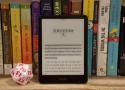
“Affected devices include Kindle 1st and 2nd Generation, Kindle DX and DX Graphite, Kindle Keyboard, Kindle 4, Kindle Touch, Kindle 5, and Kindle Paperwhite 1st Generation,” reads the message from the Kindle team. Older 2011 and 2012-era Kindle Fire tablets will also lose access to the Kindle Store.
Amazon’s Kindle generational branding is occasionally confusing—that “Kindle Paperwhite 1st Generation” is also referred to as “Kindle Paperwhite (5th Generation)” on Amazon’s support pages because it’s part of the fifth generation of Kindle releases overall. But if you check your Kindle’s software version and see anything older than 5.12.2.2, it means your Kindle is losing access to Amazon’s store and your e-book library.
It’s been a while since any of these devices received active software support from Amazon; only 2024-and-later devices have received the latest 5.19.3.0.1 software update, though 2021 and 2022’s Kindles have been updated as recently as February. Historically, though, Amazon has been willing to allow older, un-updated Kindles to continue to buy and download more books, even if they’re no longer benefitting from new features.

Thinking about self-hosting an ebook library? Here are the open source software you can consider.
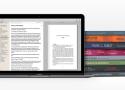
Ebooks Everywhere
Create ebooks for every platform: Kindle, Kobo, Apple Books, and more. Each specialized file can guide readers to buy your next book in their favorite store.
Completed a series? Combine everything into a box set in just a few steps.
- Validated Files in EPUB 3 / EPUB 2
- Image Optimization + Compression
- ARCs for Beta Readers in EPUB + MOBI
- ACE-Approved Accessible Output
Vellum Ebooks $199.99
Create Unlimited Ebooks
Vellum is only available for Mac
https://www.macincloud.com/
You can run the calibre server via the command:
/opt/calibre/calibre-server /path/to/the/library/you/want/to/share
No matter whether you are a developer, admirer, or just a gadget-crazed passerby; if you love reading eBooks and tinkering with mobile technology, you came to the right place. This Wiki is a knowledge base created by users of the MobileRead community.
Create account to get instant access
to all benefits of the Clipping Manager
- Upload "My Clippings.txt" file from your Kindle
- Edit your highlights
- Add personal notes
- Mark your favorite clippings
- Export your highlights into various formats
Regarded by many as the most comprehensive anthology of all time, ‘The Harvard Classics’ was first published in 1909 under the supervision of the Harvard president Charles W. Eliot. An esteemed academic, Eliot had argued that the elements of a liberal education could be gained by spending 15 minutes a day reading from a collection of books that could fit on a five-foot shelf. The publisher P. F. Collier challenged Eliot to make good on this statement and ‘Dr. Eliot’s Five Foot Shelf’ was the result. Eight years later Eliot added a further 20 volumes as a sub-collection titled ‘The Harvard Classics Shelf of Fiction’, offering some of the greatest novels and short stories of world literature. The exhaustive anthology of the ‘The Harvard Classics’ comprises every major literary figure, philosopher, religion, folklore and historical subject up to the twentieth century. This comprehensive eBook presents the complete anthology, with Eliot’s original introductions, numerous illustrations, rare texts and the usual Delphi bonus material. (Version 1).
https://www.delphiclassics.com/shop/the-harvard-classics-parts-edition-2/

Delve into the world of Dickens and his contemporaries by browsing our hand-picked selection of free to download Victorian treasures…

Once you pay for an e-book on Amazon, it has been licensed, not sold to you, according to the company's terms of service. This gives the company a lot of leeway in deciding what you do with a purchased e-book. The terms of service explicitly forbid bypassing the DRM and reading it on devices or apps that Kindle doesn't officially support. //
The legalities involved in bypassing DRM
Bypassing DRM is illegal in the US, thanks to the DMCA (Digital Millennium Copyright Act), but it may be legal in other regions. The DMCA, among other things, makes it difficult to create a legal backup of the digital media you own. I reached out to Cory Doctorow, an author and vocal DRM critic, to learn more about this subject.
In an email, he explained the complexities involved in understanding where the boundary lies here. "It isn't a copyright infringement to move a book from one device you own to another ([aka 'format shifting']). However, in 1998, the US Congress passed the Digital Millennium Copyright Act (DMCA), which created a new kind of copyright—a copyright that protects DRM itself," Doctorow wrote. "Under Section 1201 of the DMCA, it's a felony (punishable by a [five]-year prison sentence and a [$500,000] fine) to give someone a "circumvention device" that defeats an "access control" for a copyrighted work. This law applies even if you don't violate copyright.
"Say I tell you that you have my permission to move a book I wrote (and am thus the copyright holder for) from your Kindle to another device. If the Kindle book has DRM, you're still not allowed to move it. The fact that I am the copyright holder has no impact on whether Amazon—a company that didn't create or invest in my book—can prevent you from moving that book outside of its walled garden...In fact, if I supply you with a tool to remove DRM (like some versions of Calibre), then I commit a felony and Amazon can have me sent to prison for five years for giving you a tool to move my book from the Kindle app to a rival app like Kobo," he wrote.
When you download a Kindle e-book, it's available in the AZW format, and audiobooks from Audible use the proprietary AAX format. If you download these to your computer, that is format shifting, but it may be illegal if you had to circumvent DRM to do it. Doctorow added, "that means that even though copyright law says you can format shift your books, music, videos, games, [etc.], DMCA 1201 (a "paracopyright law") makes this an imprisonable felony if you have to break DRM first." //
However, without changing the DMCA, we can't expect to see real, lasting change in this space. Doctorow said as much to me: "What we really need to do is get rid of DMCA 1201, that law that makes it a crime to format shift your media...it's the same law that stops farmers from fixing their tractors, blocks independent mechanics from fixing your car, stops rivals from setting up alternative app stores for phones and games consoles...this law is a menace!"
sscnz Seniorius Lurkius
5y
7
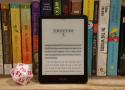
So I have a new Kobo since last year, but I also have a fairly new Kindle Paperwhite and then then we have a few more Kindles in the family. So here's what I did which allows me to read all books across all devices with progress sync and the ability to push books down to a device from Calibre.
- Jailbreak all Kindles using Winterbreak (works on latest firmware and will then disable future automatic updates from Amazon).
- Download all purchased books from Amazon, import into Calibre which will do its DRM thing on import.
- Install KOReader across all devices, enable progress sync and Calibre integration. Only works on jailbroken kindle devices but will install in seconds using a script on Kobo.
I can pick up my Kobo in my office, read a few pages, then before going to bed, pick up my Kindle on my bedside table and continue the same book where I left off.
Calibre-Web is a web app that offers a clean and intuitive interface for browsing, reading, and downloading eBooks using a valid Calibre database.
Discworld - Book Covers
I used to prefer kobodl because it's standalone, which means you don't need other proprietary software like Adobe Digial Editions or Kindle for PC (that I can't use on Linux). However, I have since discoverd a way to do this with Calibre and 2 plugins:
Leseratte10/acsm-calibre-plugin - A plugin that can read Adobe Digital Editions files that Kobo web download produces.
noDRM/DeDRM_tools - The popular DRM removal plugin.
Now you can just download the .acm file from your book list on Kobo.com and load it into Calibre desktop!
Of Captain Teach Alias Blackbeard
Edward Teach was a Bristol man born, but had sailed some time out of Jamaica in privateers, in the late French war; yet though he had often distinguished himself for his uncommon boldness and personal courage, he was never raised to any command, till he went a-pirating, which I think was at the latter end of the year 1716, ... //
Being asked the meaning of this, he only answered, by damning them, that if he did not now and then kill one of them, they would forget who he was.