This is a setup guide for hosting a Linux dedicated server for Unturned. It references the official documentation located on the GitHub repository, which should be used first with this page serving as an optional supplement.
All multiplayer servers are hosted using the Unturned Dedicated Server app, which will be installed and updated through Valve's SteamCMD tool for the purposes of this guide.



The Commands.dat file tells your Unturned server what map to use, what to call itself, how many players can join, and other settings.
This page lists various fan-made tools that can help calculations related to the gameplay of Kerbal Space Program. Unlike addons, they do not directly influence the game, as they are run separately.
Performing a transfer from an orbit of one body directly to an orbit of another one seems like serious business. A few guides published on the forums have a lot of maths and stuff, you may think this is too complicated to figure out.
Well, it is rocket science, but: it's not complicated.
In the basic orbiting tutorial, you were introduced to the concept of orbiting, and basic orbit stabilization, as well as an orbital table to help you along. Now, what if you want an orbit that isn't on that table? What if you want to have an orbit with a specific period? That's where these formulae come in.
In the basic orbiting tutorial, you were introduced to the concept of orbiting, and basic orbit stabilization, as well as an orbital table to help you along. Now, what if you want an orbit that isn't on that table? What if you want to have an orbit with a specific period? That's where these formulae come in.
The blue circle is Kerbin itself, the light blue circle around it is the top of the atmosphere. You can click+drag on the left of Kerbin to set periapsis, or on the right of Kerbin for apoapsis. You can also use the text boxes to enter altitudes and velocities numerically.
You need to specify two values in all: either altitudes of periapsis and apoapsis, velocities at periapsis and apoapsis, or both altitude and velocity at either periapsis or apoapsis. You select the values you want to enter with the Parameters menu, the remainder of the information will be computed from the values you put in. If you enter altitude and a velocity above escape velocity, it'll give you excess velocity at infinity. The apoapsis and periapsis textboxes are altitudes above mean sea level (AMSL), the text report below has both altitudes AMSL and distances from the center of Kerbin. Note that if you specify values that lead to an apoapsis lower than periapsis, the plotted orbit and contents of the text fields will be swapped automatically.
This online tool calculates delta-v and CommNet requirements in KSP (a video game, Kerbal Space Program). It helps KSP players plan and solve complex missions. Just like the game, these calculators are made to be interactive and visual to help new players quickly grasp the mechanics of rocket science.
How to Use: Simply select the body you wish to perform orbital synchronization calculations on from the drop-down list, then pick the resonance you wish to place your craft in. Example: If you wanted a 2:3 resonance, enter 2 into Numerator and 3 into Denominator.
Launch Window Planner for Kerbal Space Program
Most Hearts players place 100 points as the agreed-upon score ceiling for the game. Once hit by one of the players, the game ends, and the lowest-scoring player wins.
Setting Up
To set up the game, remove the three and four of clubs and the two and three of diamonds. This way, each player gets eight cards each.
One player must deal the cards face down and clockwise to each player.
Card Passing
After receiving their hand, the players must choose two cards to pass along. The passing rotation in 6-player Hearts goes like this:
In the first deal, all players pass two cards face down to the player on their left. They’ll then receive two cards from the person on their right.
By the second deal, the rotation reverses. Each player will pass two cards to their right and get the two cards from their left.
Third hand/deal pass the cards two players to the left, etc.
- Melon Loader: https://melonwiki.xyz/
- TLD Mods Notes: https://a.plas.ml/shaare/Ksqi_g
- Sky Co-Op Mode: https://tldmods.com/?q=sky
- https://github.com/RED1cat/SkyCoopInstaller/releases/tag/v2.2
- verify Dependencies are copied to Mods folder
Playing the Game
Goal: Win by scoring the most points after 10 questions.
How to Play
Each player gets 1 whiteboard and 10 voting tokens of their color.
The player who most recently watched a Veritasium video starts as the Question Reader.
The role of Question Reader moves clockwise each round.
The game lasts 10 questions.
Each Round
The Question Reader reads a card out loud (without taking it out of the box). Starting with the player to their left, everyone places one voting token face down on the mat.
Each chip can only be played once; if placed on the correct answer it is retained, if not it is discarded.
Players choose which token to use based on confidence:
- High number = high confidence.
- Low number = low confidence
Scoring Each Question
The Question Reader reveals the correct answer.
If you were right, move your token to your scoring pile.
If you were wrong, your token is discarded.
Game End: After 10 questions, all tokens will have been used. Players add up the numbers on their scoring piles. The player with the highest total wins!
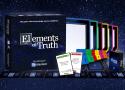
Popular science Youtuber Veritasium has their own board game coming out - Elements of Truth is a trivia game where it's not what you know, it's what you you know that counts.
Adventure II
An early (British) expanded version of the mainframe adventure game
(aka Advent440)
Jack Pike, writing in to the May 1979 issue of Practical Computing, discussed his efforts of porting the mainframe Adventure from non-standard Digital Fortran to standard Fortran; creating a new version of Adventure... //
The source code for the game was recovered by adventure historian Mike Arnautov, who has his own website about that particular version of the game (as well the history of the mainframe program and its many other ports). https://www.mipmip.org/adv440/index.html. //
There are several articles online about Adventure II. I would recommend reading Jason Dyer's exploration of the game, written as part of his All the Adventures series.
https://bluerenga.blog/tag/adventure440/?order=ASC
Welcome to Universal Paperclips|

"If the ability [to brick a console] is there, someone will want to 'see how it goes.'"
Unplug the wheel>uninstall G-HUB>manually delete the logitech folder in C:\users{name}\AppData>run RegEdit>delete the Logitech folder in LOCAL MACHINE>restart>install G-HUB again>connect the wheel>calibrate. //
Posted July 19, 2022
On 7/18/2022 at 3:28 PM, Ryansands6 said:
I finally got my wheel to somewhat work. I can now control the centering spring to were it is at a playable level but force feed back still doesn't work. I am using the Logitech G hub software and the only way I can get my wheel to connect to it is to open g hub with the wheel plugged in, then go into the windows settings and find the wheel under devices, then remove the device from the menu, then unplug the wheel and plug it back in and g hub will allow the wheel to connect. I did try to get help from the Logitech tech support and they were as useless as anything.
That sound exactly like registry/driver corruption to me. You should remove all traces of the logitech software before you connect your wheel again and let windows reinstall the drivers. //
Thank you very much.
I followed the steps you posted and my FFB and my leds are working OK again with every game. 🤟 //
I did exactly this cause i found a toturial on this but where u use the 2020 version, the 2020 version profiles for my wheel didn't even adapt to what i changed and now i did it again but this time i restarted my pc and then reinstalled it like you said and it works now! The LED and the FFB. Tbh ur a life safer dude!

RACING COCKPITS, LITE SERIES, F-GT LITE SERIES
F-GT LITE

RACING COCKPITS, LITE SERIES, GTLITE SERIES