View system information and VM configuration details
The VBoxManage list subcommands enable you to obtain information about the Oracle VirtualBox software, the VMs and associated services that you create.


Vellum is Mac-only software, but it is possible to use it by renting a Mac “in the cloud” that you can access via your PC.
This guide will walk you through using a service called MacinCloud. Currently, this service offers plans as low as $1 USD per hour. And once you are familiar with Vellum, creating your final files should take considerably less than an hour!
To resize an LVM partition in VirtualBox, first increase the virtual disk size using the command VBoxManage modifyhd <UUID> --resize <new size in MB>. Then, within the virtual machine, use commands like lvextend to expand the logical volume and resize2fs to resize the filesystem.
Resizing LVM Partition in VirtualBox
To resize an LVM partition in a VirtualBox virtual machine, follow these steps:
Step 1: Resize the Virtual Disk
- Shutdown the VM: Ensure your virtual machine is powered off.
- Open Command Line: Navigate to the VirtualBox installation directory.
- Run Resize Command: Use the following command to resize the disk:
VBoxManage modifyhd <UUID> --resize <new size in MB>
Replace<UUID>with your virtual disk's UUID and<new size in MB>with the desired size.
Step 2: Modify the Partition
- Boot the VM: Start your virtual machine.
- Check Current Partitions: Use the command:
df -lh
Identify the partition you want to resize, typically/dev/mapper/ubuntu--vg-ubuntu--lv. - Use fdisk: Run:
fdisk /dev/sda- Type
nto create a new partition. - Use default values for the partition number and first sector.
- Set the last sector to use all available space.
- Type
- Write Changes: Type
wto write the changes.
Step 3: Resize the LVM
- Create Physical Volume: Run:
pvcreate /dev/sdaX
ReplacesdaXwith your new partition fromfdiskabove. - Extend the Volume Group: Use:
vgextend <vg-name> /dev/sdaX
Replace<vg-name>with your volume group name. - Extend the Logical Volume: Run:
lvextend -l +100%FREE /dev/mapper/ubuntu--vg-ubuntu--lv
Step 4: Resize the Filesystem
- Resize the Filesystem: Finally, execute:
resize2fs /dev/mapper/ubuntu--vg-ubuntu--lv
After completing these steps, your LVM partition should be successfully resized, allowing you to utilize the additional space.
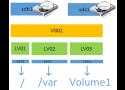
LVM is a volume manager in a Linux platform that helps us to allocate partitions in the system and configure the storage size that will be utilized for a specific volume group. There are some points to be noticed when we work with LVM on VirtualBox to resize our storage.
Hang on, that is for the setup of XN. After that you need this https://www.xigmanas.com/wiki/doku.php?id=documentation:setup_and_user_guide:virtualization_virtualbox
That's the problem I'm having - this is out of date (half way down it states *noVNC is currently broken and removed from XigmaNAS builds, please ignore below.). using a different VNC viewer I couldn't get it to connect though.
While writing this I finally figured out the issue though so to help anyone else who might get stuck with this:
By default on 'remote display' settings for the VM - 'Net Address' is set to 127.0.0.1. This is greyed out and unable to change while VM powered on. If you power off the VM and overwrite it with your Xigmanas IP then power VM back on then I could now get VNC viewer to connect.
Each VirtualBox VM can use up to eight virtual network adapters, each of which in turn is referred to as a network interface controller (NIC). Four virtual network adapters can be configured in the VirtualBox GUI (graphical user interface). All virtual network adapters (up to 8) can be configured with the VBoxManage modifyvm command. //
VirtualBox provides a long list of network modes, which is one of the most interesting features of VirtualBox network settings. Each virtual network adapter can be separately configured to operate in a different network mode. For example, you can set the NAT mode for the adapter 1 and the Host-only mode for the adapter 2. You can select the network mode in the Attached to drop-down menu.
all the tags from https://b.plas.ml
1st-amendment 2nd-amendment 4th-amendment 5th-amendment 9/11 a8 abortion acl adhd afghanistan africa a/i air-conditioning amateur-radio amazon america american android animals anti-americanism antifa anti-semitism antiv antivirus aoip apollo apple appliances archaeology architecture archive art astronomy audio automation avatar aviation backup bash batteries belleville bible biden bill-of-rights biology bookmarks books borg bush business calibre camping capitalism cellphone censorship chemistry children china christianity church cia clinton cloud coldwar communication communist composed computers congress conservatives constitution construction cooking copyleft copyright corruption cosmology counseling creation crime cron crypto culture culture-of-death cummins data database ddt dd-wrt defense democrats depression desantis development diagrams diamonds disinformation diy dns documentation dokuwiki domains dprk drm drm-tpm drugs dvd dysautonomia earth ebay ebola ebook economics education efficiency electricity electronics elements elwa email energy engineering english environment environmentalism epa ethernet ethics europe euthanasia evolution faa facebook family fbi fcc feminism finance firewall flightsim flowers fonts français france fraud freebsd free-speech fun games gardening genealogy generation generators geography geology gifts git global-warming google gop government gpl gps graphics green-energy grounding hdd-test healthcare help history hollywood homeschool hormones hosting houses hp html humor hunting hvac hymns hyper-v imap immigration india infosec infotech insects instruments interesting internet investing ip-addressing iran iraq irs islam israel itec j6 journalism jumpcloud justice kindle kodi language ldap leadership leftist leftists legal lego lgbt liberia liberty linguistics linux literature locks make malaria malware management maps markdown marriage mars math media medical meshcentral metatek metric microbit microsoft mikrotik military minecraft minidisc missions moon morality mothers motorola movies mp3 museum music mythtv names nasa nature navigation navy network news nextcloud ntp nuclear obama ocean omega opensource organizing ortlip osmc oxygen paint palemoon paper parents passwords patents patriotism pdf petroleum pets pews photography photo-mgmt physics piano picasa plesk podcast poetry police politics pollution pornography pots prayer pregnancy presentations press printers privacy programming progressive progressives prolife psychology purchasing python quotes rabbits rabies racism radiation radio railroad reagan recipes recording recycling reference regulations religion renewables republicans resume riots rockets r-pi russia russiagate safety samba satellites sbe science sci-fi scotus secularism security servers shipping ships shooting shortwave signal sjw slavery sleep snakes socialism social-media software solar space spacex spam spf spideroak sports ssh statistics steampowered streaming supplement surveillance sync tarsnap taxes tck tds technology telephones television terrorism tesla theology thorium thumbnail thunderbird time tls tools toyota trains transformers travel trump tsa twitter typography ukraine unions united.nations unix ups usa vaccinations vangelis vehicles veracrypt video virtualbox virus vitamin vivaldi vlc voting vpn w3w war water weather web whatsapp who wifi wikipedia windows wordpress wuflu ww2 xigmanas xkcd youtube zfs