Subnet routers
Use subnet routers to give devices outside your local network access to services within specific subnets. Extend your private network with Tailscale.



If your remote access is you reaching a handful of web dashboards, install Tailscale and forget about it. It's got superb polish and is seamless for that use case. My case for NetBird is specific: I wanted a control plane that's the vendor's actual product rather than a third-party reimplementation of a closed one, and I wanted to tunnel things that don't speak HTTP without asking permission from a three-port allowlist. If neither of those is your problem, NetBird's stack is overhead you don't need. If both are, there isn't really a competition.

Tailscale recently made its free tier a lot more generous this year, with the user cap going up to 6 and the hundred-device cap being axed completely. I had been using it for easy remote access for my family far before the limit change, and right after, everyone decided that they wanted access to my media server around the same time. I quickly reached 6 users, and while I was tempted to just start paying Tailscale for more space, I decided to make use of the infrastructure I was already paying for with self-hosted NetBird, and I saved myself from paying a hefty monthly fee in the process. //
Headscale exists precisely for people in my situation, and it has a key advantage, being that it replaces only the coordination server, so official Tailscale clients can continue to be used exactly as they did. //
It's not a bad solution and plenty of people use it effectively, even in the same VPS-hosted configuration that NetBird is currently in for me, but the fact that it's not official means, like many other open-source community-maintained projects, that the maintainers can simply stop maintaining it. The self-hosted NetBird solution is an official part of the NetBird product, and therefore, it gets the same official support as the cloud-based solution.

Headscale is an open source, self-hosted implementation of the Tailscale control server.
Headscale aims to implement a self-hosted, open source alternative to the Tailscale control server. Headscale's goal is to provide self-hosters and hobbyists with an open-source server they can use for their projects and labs. It implements a narrow scope, a single Tailscale network (tailnet), suitable for a personal use, or a small open-source organisation.
In this video tutorial, we'll show you how to set up WireGuard VPN on a VPS or dedicated server. In this video, we utilize a RackNerd KVM VPS installed with Ubuntu OS.
The ZeroTier network hypervisor is a self-contained network virtualization engine that implements an Ethernet virtualization layer similar to VXLAN built atop a cryptographically secure global peer-to-peer network. It provides advanced network virtualization and management capabilities on par with an enterprise SDN switch, but across both local and wide area networks and connecting almost any kind of app or device.
MikroTik has added ZeroTier to RouterOS v7.1rc2 as a separate package for the ARM/ARM64 architecture.
Zerotier has been upgraded to 1.14.0 on 7.17rc6 ROS version.
Wait, so what can I use it for?
- Hosting a game server at home (useful for LAN only games) or simply creating a LAN party with your friends;
- Accessing LAN devices behind NAT directly;
- Accessing LAN devices via SSH without opening port to the Internet;
In this guide, we’ll walk you through setting up WireGuard on your MikroTik router.
Urban VPN Proxy targets conversations across ten AI platforms: ChatGPT, Claude, Gemini, Microsoft Copilot, Perplexity, DeepSeek, Grok (xAI), Meta AI.
For each platform, the extension includes a dedicated “executor” script designed to intercept and capture conversations. The harvesting is enabled by default through hardcoded flags in the extension’s configuration.
There is no user-facing toggle to disable this. The only way to stop the data collection is to uninstall the extension entirely.
[…]
The data collection operates independently of the VPN functionality. Whether the VPN is connected or not, the harvesting runs continuously in the background.

We have setup MikroTik in different environments, its time for us to build IPsec tunnel between two sites where we have MikroTik routers.
The steps below aim to illustrate how to setup a site to site VPN between two Mikrotik devices using WireGuard. Pre-existing local networks and firewalls exist on both R1 and R2. Between R1 and R2 the WireGuard tunnel will use 172.17.0.0/30. R2 has 172.17.0.1 assigned to its WireGuard interface, while R1 has 172.17.0.2 assigned to its WireGuard interface. The network used, or the order in which IP addresses are assigned is not important, however it is considered best practice to use a point to point subnet between peers.
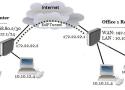
VPN (Virtual Private Network) is a technology that provides a secure tunnel across a public network. A private network user can send and receive data to any remote private network using VPN Tunnel as if his/her network device was directly connected to that private network.
MikroTik provides EoIP (Ethernet over IP) tunnel that is used to create a site to site VPN. EoIP tunneling is a MikroTik RouterOS protocol that creates an Ethernet tunnel between two MikroTik Routers on top of an IP connection. EoIP adds an outer header mentioning the entry point of the tunnel (SourceIP) and the exit point of the tunnel (DestinationIP) but the inner packet is kept unmodified.

Stupid simple setting up WireGuard - Server and multiple peers

Like most well-known remote access tools, NetBird is built on WireGuard, making it fast and known for its security. However, unlike many other remote access tools, it has identity management built into its core. Therefore, when you self-host it, the first thing you set up is Zitadel, the default identity provider. But you can use any IDP that uses OpenID, including Keycloak and Authentik. The cloud-based version supports Google Workspace, Azure, Okta, and Auth0, but this feature is only available behind the Teams' subscription tier. //
Be careful here, though, as it seems the ability to approve peers is limited to the cloud-based version, so you could end up with new users that you don't want. That's possibly okay because new users don't have access to anything unless you've set up access control to allow ALL, which is bad security practice anyway. //
NetBird is a powerful, self-hosted access tool with numerous advanced access control policies that do more than enable NAT traversal for encrypted tunnels, making SSH access to remote web servers easy to set up. You could set up one peer on your home network as a routing peer, potentially on your router, and access internal resources on your network securely. It's also simple to set up site-to-site tunnels, without the complicated firewall configurations you'd typically need. //
You can still use the free cloud-based version for up to 5 users and 100 devices, although you'd lose access to Posture Checks (handy for segmentation) and a few other things.
One one my biggest worries about VPNs is the amount of trust users need to place in them, and how opaque most of them are about who owns them and what sorts of data they retain.
A new study found that many commercials VPNS are (often surreptitiously) owned by Chinese companies.
WireGuard generally doesn’t require any performance tuning to use. It’s been designed to work well on modern network stacks under a variety of different configurations. Sending traffic through its encrypted tunnel requires only a little bit of overhead, in the form of slightly higher CPU and network usage.
That said, there are a few things you can adjust if you are experiencing WireGuard performance issues. This article will walk you through some strategies to Testing and Tuning your WireGuard network performance.

We all know that Dad is the IT infrastructure manager at home, so when it became clear that we needed a VPN for everyone to enjoy that infrastructure (aka access to streaming services) on their phones and laptops when they were away- it became Dad's job to make it happen.

Before we get into what Tailscale is or how it compares to a traditional remote access VPN, let’s take a quick look at Tailscale in action. The main problem Tailscale solves is remote access to your internal workloads.
In my homelab, I have a server running Linux. When I’m on my home network, I can access it directly without any issues. But if I step outside and want to access the same server over the Internet, Tailscale makes that much easier and you can have it up and running in about 10 minutes for free.

The main difference between Tailscale and WireGuard is that WireGuard is a self-hosted VPN server, while Tailscale adds user authentication and device management to the WireGuard VPN Protocol. Tailscale also relies on cloud servers for authentication and connection, while WireGuard is fully self-hosted and only relies on your private server.
Before looking at Tailscale vs. WireGuard more in-depth below, I want to explain exactly what they both are and how they function.
What is Tailscale?
Tailscale is a VPN service that utilizes the WireGuard Protocol. Tailscale allows you to easily create a VPN tunnel with absolutely no port forwarding. For users who have a CGNAT or simply do not feel comfortable port forwarding, Tailscale is one of the easiest ways to configure a VPN tunnel.
It’s also important to know that while Tailscale utilizes the WireGuard Protocol, it does not function the same way that WireGuard does. While they utilize the exact same point-to-point encryption, using Tailscale requires the Tailscale network to be accessible.
Tailscale is a zero-configuration VPN solution that uses WireGuard, an open-source VPN protocol. It focuses on providing an easy-to-use and configure management interface for the WireGuard protocol.
Tailscale is different than WireGuard in many ways, but it’s a better comparison to ZeroTier than WireGuard due to the way that it’s set up and configured, as well as its functionality. //
ZeroTier is a software-defined networking application that allows devices to be connected over a global network with minimal setup and configuration. It’s designed to function similarly to a local area network (LAN) environment, making it seem like all devices are connected to the same network even if they are physically located in different parts of the world.
Hi All,
I want to set up WireGuard VPN for remote work with 2 MikroTik routers: “home router” and “travel router”. Could you review my hardware and and config?
Requirements:
- “Home router” is connected to the internet in my home
- “Travel router” will be traveling with me.
- It should be possible to connect a “travel router” to any available internet - phone tethering (most often), another router, WIFI
- Traffic from any devices connected to the "travel router" should be visible as traffic from my “home router”.
- “Home router” will be connected to the router with dynamic public IP