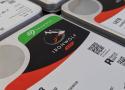
Let's face it, most of us buy NAS drives on faith. I certainly did, and every hard drive in my NAS is a NAS or enterprise model because that's what you're told to put in one. Ask why, and the answer often comes back as a single firmware timeout that determines how long a drive keeps fighting a bad sector before it gives up. It's not the only specification you should pay attention to, but it's an important one for when using RAID.
That timeout goes by three names: TLER on WD drives, ERC on Seagate, and CCTL on Samsung and Hitachi. It's been a spec-sheet bullet since WD's RE4 server drive advertised it in 2009, and it's a big reason people tell you to buy the best hard drives for NAS instead of whatever's cheapest. So I asked my own drives what they were set to, and the number wasn't the one I expected.
Picture a drive hitting a sector it can't read cleanly. A desktop drive will keep rereading it, adjusting and retrying, because it assumes it holds the only copy of your data and giving up means losing it. That's the right call for a lone drive in a PC, and it's why desktop drives have traditionally shipped with the limit switched off.
In an array, that stubbornness backfires. Once you set up RAID in a NAS, another copy of that data sits on a different drive, and the array would rather rebuild the sector from there than wait. Hardware RAID controllers drop a drive that stalls past their command timeout, while Linux waits 30 seconds by default before resetting a drive that's gone quiet. A time-limited drive gives up early, reports the error, and lets the array fix it, saving you time and your data.
sudo smartctl -l scterc /dev/sde remembering that smartctl counts in tenths of a second:
sudo smartctl -l scterc,70,70 /dev/sde

You can install and run pkgs in an embedded install via unionfs_mount. I have done this for over 12 years (as of mid-2025) without any problems whatsoever. No jails or VM, and it's quick and easy to set up.
INSTRUCTIONS:
-
Choose one of your data discs (NOT system disc). Mine is /mnt/HDD.
-
Enter the following commands (change the name "extensions" to whatever you choose):
cd /mnt/HDD
mkdir extensions
mkdir extensions/usr
mkdir extensions/usr/local
mkdir extensions/var
mkdir extensions/var/db
mkdir extensions/var/db/pkg
mkdir extensions/var/cache
mkdir extensions/var/cache/pkg- Then go to "Command Scripts" and add the following commands in this order (all PostInit and usually the first commands). They're all important!
rsync -a /usr/local/ /mnt/HDD/extensions/usr/local/
mount_unionfs -o rw /mnt/HDD/extensions/usr/local/ /usr/local/
mount_unionfs -o rw /mnt/HDD/extensions/var/db/pkg /var/db/pkg
mkdir /var/cache && mkdir /var/cache/pkg
mount_unionfs -o rw /mnt/HDD/extensions/var/cache/pkg /var/cache/pkg-
Of course, you should modify the above commands to reflect the name of your selected data disc and the name you choose for your primary directory (in my case /extensions)
-
Reboot XNAS
You should now be able to add (and later upgrade) all desired pkgs, and they will remain and operate the same as if you did a full install.
You might hear of the so-called "dangers" of unionfs_mount - THEY DON'T APPLY TO AN EMBEDDED INSTALL, which by its very nature makes it impossible to screw up your system. Should there ever be any problem installing a package(and I've never experienced any), all one has to do is disable the command script items and reboot for a "clean" install.
ZFS (previously Zettabyte File System) is a Enterprise-grade and highly scalable advanced filesystem. ZFS is a fundamentally different file system because it is more than just a file system.
ZFS combines the roles of file system and volume manager, enabling additional storage devices to be added to a live system and having the new space available on all of the existing file systems in that pool immediately. By combining the traditionally separate roles, ZFS is able to overcome previous limitations that prevented RAID groups being able to grow. Each top-level device in a zpool is called a vdev, which can be a simple disk or a RAID transformation such as a mirror or RAID-Z array. ZFS file systems (called datasets) each have access to the combined free space of the entire pool. As blocks are allocated from the pool, the space available to each file system decreases. This approach avoids the common pitfall with extensive partitioning where free space becomes fragmented across the partitions.
Self-healing data protection is built-in natively to XigmaNAS and ZFS. This gives the file system the ability to automatically recover from drive errors and failures without the loss of data/corruptions of data.
Ventoy is an open source tool to create bootable USB drive for ISO/WIM/IMG/VHD(x)/EFI files.
With Ventoy, you don't need to format the disk over and over, just drag-and-drop files to the USB drive and boot them directly.
You can copy many files to different folders and Ventoy will give you a boot menu to select them (screenshot).
You can also browse ISO/WIM/IMG/VHD(x)/EFI files in local disks and directly boot them.
x86 Legacy BIOS, IA32 UEFI, x86_64 UEFI, ARM64 UEFI and MIPS64EL UEFI are supported in the same way.
Most types of OS supported
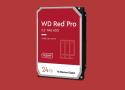
Struggling to tell the difference between WD’s NAS HDDs? This will help.
I too, was affect by the samba issue. This is 100% reproducible by installing 10531, then upgrading to 10566 (full install).
But you don't need a full reinstall. To fix it, simply delete the file:
/usr/local/lib/libndr.so.6Looking at revision r10565 the root path of the installed Samba libraries was changed from /usr/local/lib to /usr/local/lib/samba4.
In the commit an obsolete file list was updated but it doesn't include the file above /usr/local/lib/libndr.so.6.
The directory /usr/local/lib/samba (no 4 at the end) has been moved to /usr/local/lib/samba4/private, so the first one should not exist now.
The following Bash script (don't just paste it to tcsh shell) should help you find other possibly obsolete samba libraries that exist under /usr/local/lib. I still have some, but they are not creating problems at the moment.
#!/usr/bin/env bash

set -e

samba-libs() {
    libs="$(find /usr/local/lib/samba4 -maxdepth 1 -type f)"
    libs="$(sed -r 's/\.[0-9]+$//' <<< "$libs")"
    libs="$(sed -r 's/\/lib\/samba4\//\/lib\//' <<< "$libs")"
    uniq <<< "$libs"
}

found=()

for f in $(samba-libs); do
    shopt -s nullglob
    found+=("${f}"*)
    shopt -u nullglob
done

printf '%s\n' "${found[@]}"victort » Apr 3rd, '25, 17:22
I've added this to my "status-report.sh" script that gets sent to my email every day at 6 AM.
echo "DISK HEALTH"
echo "-----------"
# Check disk health
for disk in $(sysctl -n kern.disks); do
    echo $disk
    smartctl -H /dev/$disk | grep "result"
done
I now get a report every day of all my disks.
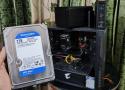
TrueNAS Scale, Unraid, and OpenMediaVault stand at the apex of the Network-Attached Storage OS landscape, with each distribution featuring its own perks and quirks. However, they’re far from the only options at your disposal. Even without harnessing the power of virtualization, you can turn Proxmox into a reliable file-sharing server once you arm it with the right set of packages – and the same holds for Debian, Fedora, and other general-purpose distributions.
But on the other side of the popularity spectrum, you’ve got obscure distributions that are seldom discussed by tinkerers, data hoarders, and home labbers. In my search for wacky projects and cool DIY ideas, I recently stumbled upon XigmaNAS, a FreeBSD-powered distribution designed for storage servers and NAS solutions. Having played around with it over the weekend, I’ll admit that XigmaNAS deserves far more credit than it currently receives.
Hang on, that is for the setup of XN. After that you need this https://www.xigmanas.com/wiki/doku.php?id=documentation:setup_and_user_guide:virtualization_virtualbox
That's the problem I'm having - this is out of date (half way down it states *noVNC is currently broken and removed from XigmaNAS builds, please ignore below.). using a different VNC viewer I couldn't get it to connect though.
While writing this I finally figured out the issue though so to help anyone else who might get stuck with this:
By default on 'remote display' settings for the VM - 'Net Address' is set to 127.0.0.1. This is greyed out and unable to change while VM powered on. If you power off the VM and overwrite it with your Xigmanas IP then power VM back on then I could now get VNC viewer to connect.
My WebGUI hostsallow contained ONLY external IP addresses and not my local lan addres.
Solved it by editing (blanking) _hostsallowed variable in /etc/rc.d/lighttpd and restarting lighttppd.
PS: The script /etc/rc.d/lighttpd generates the config /var/etc/lighttpd; editing this config file directly does not work.
///
Temporary fix to regain access to WebGUI
Currently we can have a home or small office NAS server from manufacturers such as QNAP, Synology or ASUSTOR among other manufacturers. However, you can also mount a NAS with the hardware you want, you will only have to install an operating system oriented to a NAS server, such as XigmaNAS. This operating system is one of the best we can find to use as a NAS server, it comes with a large number of services already installed, and it will even allow us to install any software that is compatible with FreeBSD. Do you want to know everything about this NAS-oriented operating system and how to configure it from scratch?
An Open Source ZFS NAS for the community
A community based fork of TrueNAS CORE
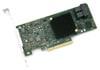
The LSI SAS 9300 HBAs are specifically designed for high performance in high-end servers that connect to large scale storage enclosures as well as for internal drive connectivity in 1U/2U servers and workstations. At the heart of the SAS 9300 HBA line is the LSI SAS 3008 IO controller, which takes advantage of the latest advances in SAS and PCI Express technology while reaching over 1 million IOPs from a single IOC. Additionally, each HBA from the 9300 line supports 8 or 4 individual SAS ports, which operate at 12Gb/s and are backward compatible with previous PCIe and SAS generations using automatic negotiation.

For a file server-only oriented board look no further than X10SDV-2C-7TP4F. I wish I’d bought it instead of the version I have now.
Very low power, 22 SATA ports (of which 2 are SATADOM), etc. You’re really unlikely to outgrow it as a file server.
My system
Modified Lian Li A76 case with SuperMicro X10SDV-7TP4F with 128GB of ECC RAM and a Z3 pool consisting of eight HGST 10TB HE10 drives, three 1.6TB S3610 Intel SSDs for the sVDEV, mirrored 64GB SuperMicro SATADOM boot drives, a 1TB Samsung 860-series mSATA L2ARC, and a Intel P4801x Optane SLOG, onboard SFP+ with MM fiber, riding the TrueNAS CORE 13.x stable train @ 106 W/hr.
With the introduction of SAS 12Gbps, seems like "it's time" to do a braindump on SAS.
Work in progress, as usual.
History
By the late '90's, SCSI and PATA were the dominant technologies to attach disks. Both were parallel bus multiple drop topologies and this kind of sucked. SATA and Serial Attached SCSI (SAS) evolved from those, using a serial bus and hub-and-spoke design.
Early SATA/150 and SATA/300 were a bit rough and had some issues, as did SAS 3Gbps. You probably want to avoid older controllers, cabling, expanders, etc. that doesn't support 6Gbps because some of it has "gotchas" in it. In particular a lot of it has 2TB size limitations. Most 3Gbps hard drives are fine though.
Similarities, Differences, Interoperability
SAS and SATA operate at the same link speeds and use similar cabling. SAS normally operates at a higher voltage than SATA and can run over longer cabling.
SAS and SATA use different connectors on the drive. The SATA drive connector has a gap between the signal and power sections, which allows separate power and data cables to be easily connected. The SAS drive connector does not have a gap, and instead has a second set of pins on top. This second set of pins is the second (redundant) SAS port. There are pictures of the top and the bottom of the drive connector.
SATA drives can be attached to a SAS port. Electrically, the SAS port is designed to allow attachment of a SATA drive, and will automatically run at SATA-appropriate voltages. Physically, the SAS backplane connector has an area that will allow either the gapless SAS or the gapped SATA connector to fit. See picture of SAS backplane socket.
SAS drives are incompatible with SATA ports, however, and a SATA connector will not attach to an SAS drive. Don't try. The gap is there to block a SAS drive from being connected to typical SATA cabling, or to a SATA backplane socket.
When a SATA drive is attached to a SAS port, it is operated in a special mode using the Serial ATA Tunneling Protocol (STP).
1) An HBA is a Host Bus Adapter.
This is a controller that allows SAS and SATA devices to be attached to, and communicate directly with, a server. RAID controllers typically aggregate several disks into a Virtual Disk abstraction of some sort, and even in "JBOD" or "HBA mode" generally hide the physical device. If you cannot see the type of device (such as "ST6000DX000-1H217Z" in "camcontrol devlist", you DO NOT HAVE A TRUE HBA. If you cannot get the output of "smartctl" for a device, you DO NOT HAVE A TRUE HBA. A true HBA passes communications through itself directly to a drive without further processing. No amount of marketing department wishful thinking can change that technical reality.
2) FreeBSD has incredibly robust support for the LSI HBA's.
FreeBSD's LSI HBA (mps/mpr) drivers are authored by LSI and carefully designed to work with their HBA firmware. The FreeNAS userbase has installed many thousands of these cards which have, in aggregate, BILLIONS of problem-free run-hours. Not only are they known to work very well during normal operations, but they're also known to work correctly during ABNORMAL operations, such as when a disk times out or throws an error. SMART is properly supported. Forum members are incredibly familiar with all the variations on these and can provide useful assistance. Cards such as the LSI 9240-8i, IBM ServeRAID M1015, Dell PERC H200 and H310, and others are readily available on the used market and can be converted to LSI 9211-8i equivalents.
3) You must crossflash to IT/IR firmware
If you don't crossflash, then a lot of the remainder of this ALSO applies to LSI non-IT-20.00.07.00 HBA's!! The IR firmware is also fine but is a few percent slower. It is not clear there is any value to doing this as you would never want to use an IR virtual device with FreeNAS. We used to do this in the old days for boot devices, but with ZFS boot this is probably no longer relevant.
The LSI 9240 (etc) default MFI firmware is apparently being sold on eBay as "IR" by clueless sellers. The MFI firmware is unsuitable for FreeNAS and may cause your pool to get eaten.
The LSI 9211-8i (PCIe 2.0 based on LSI 6Gbps SAS2008) and LSI 9207-8i (PCIe 3.0 based on LSI 6Gbps SAS2308) both require firmware 20.00.07.00.
TrueNAS is not as simple as videos make it look, though it is fairly easy to get a system running if you read the documentation and don't color outside the lines.
If you want to save yourself lots of money and loads of time, the top of the page has Documentation and Resources tabs which contain extremely helpful information like the TrueNAS manuals. There's also a Search tool at the upper-right that works extremely well. If you understand the system and requirements before jumping in you'll save money, time, and frustration.
As general advice, if you run TrueNAS as a NAS and don't add things to it it tends to run fine and without issue, though I suggest using an Uninterruptible Power Supply and NUT.

Secret #1: Five different things affect file permissions
No one just comes out and says it. I had to really delve into how things are set up to figure this out.
Otherwise, you’ll be stuck with files that get permissions that you swear you didn’t set. It will drive you insane. Once I started to see how all the parts worked together, it made more sense.
The five things controlling file permissions are:
- Unix file and folder permissions
- Samba share permissions
- ZFS dataset permissions
- ZFS ACL
- umask
That’s right, five things! Crazy. Each of those things can affect the permissions of files and folders created in your Samba shares in Xigmanas. Before this weekend, I only knew about #1, #2, and #3, but #4 and #5 were little sneaky surprises.
Secret #2: You need to restart Samba after every change
When you change settings on your Samba shares in Xigmanas and then apply them, you’d expect the changes to take effect. After all, that’s how Xigmanas works for everything else. But, not here.
You must restart Samba after making changes, especially around permissions and inheritance, in order for them to take effect.
To do this, just go to Services > CIFS/SMB, then click the Save & Restart button at the bottom of the page.
USB 20x4 LCD PC modding - black cover (black characters yellow backlight)
My server uses a internal lcd screen i had ordered some time ago from here: http://www.lcdmodkit.com/lcd.html ~ $40USD //
Here is what i have used on the page Services > LCDproc
LCDproc
Driver: hd44780
Port: 13666
Wait Time: 12
Title Speed: 5
Driver Parameter:
#USB connected HD44780 based LCD
ConnectionType=lcd2usb
Contrast=900
Brightness=5
OffBrightness=5
Keypad=yes
Backlight=yes
Size=20x4
#KeyDirect_1=Enter
#KeyDirect_2=Down
#KeyDirect_3=Escape
KeepAliveDisplay=1
ReportLevel = 5