
I'd strongly suggest not to use find -L for the task (see below for explanation). Here are some other ways to do this:
If you want to use a "pure find" method, and assuming the GNU implementation of find, it should rather look like this:
find . -xtype l
(xtype is a test performed on a dereferenced link)


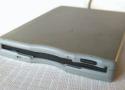
Just insert a disk and the TV starts playing three-year-old’s favorite shows. //
The one thing Olesen said he'd do differently, were he to redesign the entire project, would be to eliminate the Chromecast due to excessive latency and connect a computer directly to the TV. That, and he wishes he would have programmed a different melody onto each disk that would play from the drive itself when a disk was inserted, which he told us "should be totally doable" if he ever gets around to it.
If you, too, long for the era when a satisfying ca-chunk preceded file transfers and want to find something useful to do with that old floppy disk drive rotting away in that box of old computer stuff, Olesen's entire codebase and other relevant project files are available on GitHub. ®
https://github.com/mchro/FloppyDiskCast

Download an entire website with wget, along with assets.
# One liner
wget --recursive --page-requisites --adjust-extension --span-hosts --convert-links --restrict-file-names=windows --domains yoursite.com --no-parent yoursite.com

# Explained
wget \
     --recursive \ # Download the whole site.
     --page-requisites \ # Get all assets/elements (CSS/JS/images).
     --adjust-extension \ # Save files with .html on the end.
     --span-hosts \ # Include necessary assets from offsite as well.
     --convert-links \ # Update links to still work in the static version.
     --restrict-file-names=windows \ # Modify filenames to work in Windows as well.
     --domains yoursite.com \ # Do not follow links outside this domain.
     --no-parent \ # Don't follow links outside the directory you pass in.
         yoursite.com/whatever/path # The URL to download
The data=writeback mount option deserves to be tried, in order to prevent journaling of the file system. This should be done only during the deletion time, there is a risk however if the server is being shutdown or rebooted during the delete operation.
According to this page,
Some applications show very significant speed improvement when it is used. For example, speed improvements can be seen (...) when applications create and delete large volumes of small files.
The option is set either in fstab or during the mount operation, replacing data=ordered with data=writeback. The file system containing the files to be deleted has to be remounted. //
He could also increase the time from the commit option: "This default value (or any low value) will hurt performance, but it's good for data-safety. Setting it to 0 will have the same effect as leaving it at the default (5 seconds). Setting it to very large values will improve performance". –
Cristian Ciupitu Commented Sep 26, 2010 at 19:14
Lastly, FYI, not mentioned in that link is that fact that data=writeback can be a huge security hole, since data pointed to by a given entry may not have the data that was written there by the app, meaning that a crash could result in the old, possibly-sensitive/private data being exposed. Not a concern here, since we're only turning it on temporarily, but I wanted to alert everyone to that caveat in case either you or others who run across that suggestion weren't aware. –
BMDan Commented Sep 27, 2010 at 1:23
cat is surely the best way to do this. Why use python when there is a program already written in C for this purpose? However, you might want to consider using xargs in case the command line length exceeds ARG_MAX and you need more than one cat. Using GNU tools, this is equivalent to what you already have:
find . -maxdepth 1 -type f -name 'input_file*' -print0 |
  sort -z |
xargs -0 cat -- >>outwhat is the fastest method to CREATE a thousands of files? Also, does it really matter if there is data in them, if they are just being deleted?
Using rsync is surprising fast and simple.
mkdir empty_dir
rsync -rd --delete empty_dir/    yourdirectory/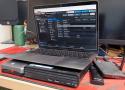
But ZFS also comes with an uncomfortable truth that doesn't get talked about enough: the filesystem is only as good as the operating system wrapping it. And if you're running ZFS on a generic Linux distribution, you're often signing up for more risk, maintenance, and subtle breakage than you expect. ZFS works on Linux, and many use it daily, but it's not a seamless, built-in part of the kernel. Instead, it's an add-on with caveats, and setting it up can feel frustratingly difficult. //
The problem with ZFS is Oracle
Licensing is a major issue
the Linux kernel's GPLv2 license is legally incompatible with ZFS's CDDL license, meaning that it can't be combined with the Linux kernel. Oracle's licensing is the major bottleneck.
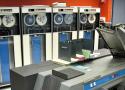
Crucial early evolutionary step found, imaged, and ... amazingly ... works
Computer History Museum software curator Al Kossow has successfully retrieved the contents of the over-half-a-century old tape found at the University of Utah last month.
UNIX V4, the first ever version of the UNIX operating system in which the kernel was written in the then-new C programming language, has been successfully recovered from a 1970s nine-track tape drive. You can download it from the Internet Archive, and run it in SimH. On Mastodon, "Flexion" posted a screenshot of it running under SGI IRIX.
https://archive.org/details/utah_unix_v4_raw //
The very first version of Unix, later known as the "Zeroth edition", was hand-coded in assembly language by Thompson in 1969. He wrote it for a spare PDP-7 at Bell Labs, a Digital Equipment Corporation minicomputer from 1965. The PDP-7 was an 18-bit machine: it handled memory in 18-bit words. This was so long ago that things like the eight-bit byte had not yet been standardized. PDP-7 UNIX was reconstructed from printouts between 2016 and 2019.
It did well enough that a few years later, Thompson got his hands on a PDP-11. Thompson rewrote his OS for this 16-bit machine – still in assembly language – to create UNIX First Edition. At first, the machine had a single RS11 hard disk, for a grand total of half a megabyte of storage, although the rebuilt source code is from a later machine with a second hard disk.
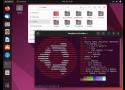
All the mainstream distros (Ubuntu and Mint, openSUSE and Gecko Linux, Fedora, Debian) come with largely the same choice of desktops, and they're all the same. //
I am also not saying that any of these environments are bad. I have my own preferences, but I completely respect that other people have their own. That's fine too.
That is not the purpose of this piece.
What it is asking is: why are they all the same?
So many different implementations of the "traditional" (since 1995) taskbar-and-launch-menu are not different desktops.
Yes, there are differences, but they are trivial and cosmetic. //
The hidden price of duplicated effort
A very important aspect of this is accessibility. Not only for blind users, but they make a good example. GNOME 2 was reasonably good for people without eyesight, but it's gone, and none of its inheritors come close to matching it.
An excellent and very simple test of accessibility is to use a desktop PC and just unplug the mouse. Windows remains highly usable with only a keyboard. As standard, without enabling any special accessibility aids, windows can be opened, moved, resized, switched and closed, entirely with the keyboard. //
The accessibility features and keyboard controls of macOS are not available at all until enabled, whereas in Windows, they are part of the standard UI, there for everyone to use. //
There are other designs out there. There are more desktops than Windows and macOS, and all offer their own unique benefits. Reimplementing the same old desktop model over and over again doesn't help anyone: it just wastes a huge amount of talent and effort. ® //
Tuesday 17th May 2022 08:55 GMT
DrXymSilver badge
The curse of overchoice
Overchoice is actually a term for when a consumer is given so many options, often varying in ways which are meaningless or confusing that they end up making no choice at all.
Linux has always had that issue and it is illustrated in the article in all the desktops that exist or existed. I expect most prospective Linux users just want to install the thing and use it for something. They really don't care what desktop is powering their experience providing it is easy to use, discoverable, familiar, doesn't throw any nasty surprises at them and lets them get on and do stuff.

There are an almost ridiculous number of Windows-style desktops on Linux – and mostly this applies to the BSDs, too. Most of them are implemented in C, and most use various versions of the Gtk toolkit for their widgets: menus, dialog boxes, buttons and so on.
In approximate age order, the ones still being maintained today are Xfce; MATE, which is a fork of GNOME 2; LXDE; Linux Mint's Cinnamon; and Budgie, implemented in the GNOME-centric Vala language. //
Now we're up to 23. We could dig deeper, but we hope that we've made the point by now. There are several different languages here (but a lot fewer than 23 of them), and several different graphical toolkits (but again, well under 20). This is a vast amount of effort spent reinventing, and then maintaining, the basic concept of a round thing on the end of an axle.
But the underlying concept here is really quite a simple one. The window managers can't match the functionality of the Windows 95 Explorer, and not one of the desktops captures the simple elegance of the original. Windows 95 let you put the taskbar on any screen edge, but you only got one, and you couldn't change its length, or re-arrange or resize its contents, let alone change their orientation. Multiple rows was your only option. //
Remember the Basics of the Unix Philosophy:
Write programs that do one thing and do it well. Write programs to work together. Write programs to handle text streams, because that is a universal interface.
That 1995 design was simple. The components of the desktop – the task bar, the file manager, the text editor, and so on – don't need to exchange lots of rich, complex messages. //
Nearly two dozen different Windows-like UIs represents a titanic waste of programmer effort, skill, and time. Hundreds, maybe thousands of people, working hard for decades… but all on different projects, meaning that none of them achieve greatness. For an example, look at KDE Plasma's 36 launcher menus.
It is 27 years since the first release of KDE, and I suspect that Microsoft has been laughing all the way to the bank ever since. The FOSS world can do better, and it's time it started to try. ®
admin-tools is available as an AppImage which means "one app = one file", which you can download and run on your Linux system while you don't need a package manager and nothing gets changed in your system. Awesome!
AppImages are single-file applications that run on most Linux distributions. Download an application, make it executable, and run! No need to install. No system libraries or system preferences are altered. Most AppImages run on recent versions of Arch Linux, CentOS, Debian, Fedora, openSUSE, Red Hat, Ubuntu, and other common desktop distributions.
calibre has a binary install that includes private versions of all its dependencies. It runs on 64-bit Intel or ARM compatible machines. To install or upgrade, simply copy and paste the following command into a terminal and press Enter:
sudo -v && wget -nv -O- https://download.calibre-ebook.com/linux-installer.sh | sudo sh /dev/stdin

sudo apt install libxkbcommon0
rsync -r --ignore-existing --include=*/ --include=*.js --exclude=* source/ destination- -r to recurse into directories,
- --ignore-existing to ignore existing files in destination,
the include and exclude filters mean: include all directories, include all *.js files, exclude the rest; the first include is needed, otherwise the final exclude will also exclude directories before their content is scanned.
Finally, you can add a -P if you want to watch progress, a --list-only if you want to see what it would copy without actually copying, and a -t if you want to preserve the timestamps.
To resize an LVM partition in VirtualBox, first increase the virtual disk size using the command VBoxManage modifyhd <UUID> --resize <new size in MB>. Then, within the virtual machine, use commands like lvextend to expand the logical volume and resize2fs to resize the filesystem.
Resizing LVM Partition in VirtualBox
To resize an LVM partition in a VirtualBox virtual machine, follow these steps:
Step 1: Resize the Virtual Disk
- Shutdown the VM: Ensure your virtual machine is powered off.
- Open Command Line: Navigate to the VirtualBox installation directory.
- Run Resize Command: Use the following command to resize the disk:
VBoxManage modifyhd <UUID> --resize <new size in MB>
Replace<UUID>with your virtual disk's UUID and<new size in MB>with the desired size.
Step 2: Modify the Partition
- Boot the VM: Start your virtual machine.
- Check Current Partitions: Use the command:
df -lh
Identify the partition you want to resize, typically/dev/mapper/ubuntu--vg-ubuntu--lv. - Use fdisk: Run:
fdisk /dev/sda- Type
nto create a new partition. - Use default values for the partition number and first sector.
- Set the last sector to use all available space.
- Type
- Write Changes: Type
wto write the changes.
Step 3: Resize the LVM
- Create Physical Volume: Run:
pvcreate /dev/sdaX
ReplacesdaXwith your new partition fromfdiskabove. - Extend the Volume Group: Use:
vgextend <vg-name> /dev/sdaX
Replace<vg-name>with your volume group name. - Extend the Logical Volume: Run:
lvextend -l +100%FREE /dev/mapper/ubuntu--vg-ubuntu--lv
Step 4: Resize the Filesystem
- Resize the Filesystem: Finally, execute:
resize2fs /dev/mapper/ubuntu--vg-ubuntu--lv
After completing these steps, your LVM partition should be successfully resized, allowing you to utilize the additional space.
POV: You’re a sysadmin who set up a one-off Linux machine for an app you needed, and now it’s out of disk space.
You originally spun up a VM, installed a recent Ubuntu OS, and just hit Next, Next, Finish through the guided install. Linux is not your bread and butter, you usually deal in Windows, and you just need to get this done.
Approx Reading Time: 10 minutes
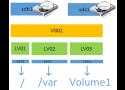
LVM is a volume manager in a Linux platform that helps us to allocate partitions in the system and configure the storage size that will be utilized for a specific volume group. There are some points to be noticed when we work with LVM on VirtualBox to resize our storage.
You can run the calibre server via the command:
/opt/calibre/calibre-server /path/to/the/library/you/want/to/share

Step 1: Add the User to the Sudo Group
First, add the user to the group of sudo by replacing the “vboxuser” with the actual username in the below command:
# sudo usermod -aG sudo [username]
Step 2: Verify the Addition of the User to sudo Group
To verify the successful execution of the above command, list the groups in which “vboxuser” is a part:
# groups vboxuser
Lee DSilver badge
Reply Icon
The primary reason to remove code is maintenance burden.
Every time you want to change some underlying API, or migrate to a new primitive, or introduce new locking, you have a bunch of old code that receives really quite devasting changes that can't be automated... and there's nobody using or maintaining that code to check it still works properly in all possible instances. Then some pillock boots it up on their NAS products as part of their natural firmware upgrades, and it starts trashing customer's NAS data because of some niche side-effect, and now you have a major NAS vendor telling its customers that Linux isn't reliable and just trashed all their customer's filesystems.
As soon as something falls out of active maintenance, it has to be marked for deprecation to let people know not to use it, and if nobody steps up to maintain it, it gets removed.
Lack of maintenance is literally the primary reason for code removal in the Linux kernel. Things that should have been removed decades ago were still actively maintained, so they were allowed to stick around until the last maintainers left (not the last users!). Similarly, things that were brand-new but didn't have adequate maintenance were removed and pushed back out of tree. In fact, one of the main reasons for being refused to be pulled in-tree is that someone then has to maintain it forever. And that's a huge burden for code they may not understand, so it can take DECADES to get code into mainline simply because you have to break it down and get every piece in and slip it past all the maintainers before you ever get close to actually merging the final product, and then you have to prove that enough people will use it so that enough people will be around to maintain it so that kernel maintainers aren't spending half their life trying to fix issues in other people's code that they don't understand.
And this severely affects security. One locking or permission change, and if you don't go updating all your code you are leaving security holes in the kernel. That can't be allowed. And if there's nobody around to say "Yeah, I've fixed bcachefs against this new novel attack that we're seeing throughout the kernel code" then it gets removed. Quite rightly.
People think it's personalities, or technicalities, or some desire to just move into every new thing and throw away every old thing (which is utter nonsense, Linux supports some ridiculously antique stuff still), it's not. It's about maintenance. The one thing Linux lacks is good maintainers with time on their hands to do that job, usually for free! Those are the most valuable and precious resources. And, as things like NTFS filesystem support cough Paragon cough, whole-kernel mass-patches that nobody is willing to break down (cough grsecurity cough) etc. have found out... it doesn't matter how great your code is, if people aren't willing to maintain it you have a decades-long uphill battle to get it into the kernel, let alone keep it there.
Nobody wants to babysit your code in perpetuity, especially if... when a new maintainer is required... not one competent, trusted person is willing to step up and say "I'll do that".