Bebu sa Ware
"the last full Moon on Feb. 29 was in 1972, and the next will be in 2048"
Just in case you were wondering. ;)
If you trust some gratuitous browser AI that kicks off with:
People also ask "Has there ever been a full moon on February 29th?"
What people ? Not normal people surely ? El Rego commentards excepted of course perhaps.
Jonathan Richards 1
Re: "the last full Moon on Feb. 29 was in 1972, and the next will be in 2048"
See, this is the quality investigative citizen journalism that I come here for.
--> Friday pint behind the bar
Philo T Farnsworth
Re: "the last full Moon on Feb. 29 was in 1972, and the next will be in 2048"
I'm hoping to make it to 2048 since I'll be a power of 10 in a power of 2.
Yes, I'm an old geezer.


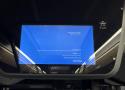
ʎɹǝʌoɔǝᴚ sʍopuᴉM ʇɐ sǝʇɐuᴉɯɹǝʇ snq sᴉɥ┴
One destination passengers were definitely not hoping to reach
Bork!Bork!Bork! As if to demonstrate that whatever one operating system can do, Windows can do it better, bluer, and upside down, we present a bus stopping only at bork.
Today's example of signage woes - thanks to reader Spike - comes from a Nottingham bus, headed for Recovery (though hopefully the right way up).
According to an eagle-eyed Register reader, the screen normally shows the next few stops, but now it is only displaying a baleful blue screen and a warning that Windows is very unhappy about something.
"Your PC/Device needs to be repaired" is not the message a bus's passengers expect to see.

Just insert a disk and the TV starts playing three-year-old’s favorite shows. //
The one thing Olesen said he'd do differently, were he to redesign the entire project, would be to eliminate the Chromecast due to excessive latency and connect a computer directly to the TV. That, and he wishes he would have programmed a different melody onto each disk that would play from the drive itself when a disk was inserted, which he told us "should be totally doable" if he ever gets around to it.
If you, too, long for the era when a satisfying ca-chunk preceded file transfers and want to find something useful to do with that old floppy disk drive rotting away in that box of old computer stuff, Olesen's entire codebase and other relevant project files are available on GitHub. ®
https://github.com/mchro/FloppyDiskCast

I’ve started only buying smart devices if there’s already an active community project to provide firmware and such should the company disappear or give up. If you want the convenience of “smart” devices, you have to compromise somewhere.
You can also buy devices that use open protocols like zwave, zigbee, or thread/matter. zwave is by far the best of the 3 because the certification requires that the devices properly implement the standard so any controller can manage any device, however that also makes it the most expensive and least flexible of the 3. For me stuff I care about long-term support for is zwave (thermostat, living room lights including wall controller), stuff that I'm less worried about having to possibly replace some day like motion detection or smart outlets can be zigbee, or Matter. Thread/Matter is starting to get to the point where the standard and interoperability testing is robust enough that I might consider it for my mission critical stuff in the near future.
As far as music, I've got 20 year old speakers hooked up to a 10 year old receiver that gets fed by the TV or anything plugged into it, thanks to HDMI ARC I don't have to worry about what TV I use or what device is plugged into it, downside of course is that the TV has to be turned on and tuned to the music source (not a big deal for my personal situation, others may not like the compromise).
23 hrs
volsano
One Y2K remediation I worked on had systems from the 1960s -- crucial systems that ran the whole show.
We easily (for some definitions of the word) fixed their 1980s and 1990s stuff that used 2-digit years.
But we did not touch the 1960s and 1970s stuff that had a specialised date storage format. It was 16-bit dates. 7 bits for year. 9 bits for day of year.
It was too assemblery, too unstructured, too ancient.
And, anyway, 9-bit year counting from 1900 (as they did) was good until the unimaginably far future.
The unimaginably far future is nearly with us: 1900 + 127 = 2027.
I am waiting for the phone to ring so I can apologise, - and quote them an unimaginably large number to finish the job.
After some time, the VAX crashed. It was on a service contract, and Digital was called. Laura Creighton was not called although she was on the short list of people who were supposed to be called in case of problem. The Digital Field Service engineer came in, removed the disk from the drive, figured it was then okay to remove the tape and make the drive writeable, and proceeded to put a scratch disk into the drive and run diagnostics which wrote to that drive.
Well, diagnostics for disk drives are designed to shake up the equipment. But monkey brains are not designed to handle the electrical signals they received. You can imagine the convulsions that resulted. Two of the monkeys were stunned, and three died. The Digital engineer needed to be calmed down; he was going to call the Humane Society. This became known as the Great Dead Monkey Project, and it leads of course to the aphorism I use as my motto: You should not conduct tests while valuable monkeys are connected, so "Always mount a scratch monkey."
Laura Creighton points out that although this is told as a gruesomely amusing story, three monkeys did lose their lives, and there are lessons to be learned in treatment of animals and risk management. Particularly, the sign on the disk drive should have explained why the drive should never have been enabled for write access.
David 132Silver badge
Happy
"Worst prank ever"?
at least for a few moments, because the phone soon rang.
"It was the Australian office, laughing their heads off..."
Ah, what they should have done, instead of just hanging up the phone at local midnight, is babble something incoherent about "my god... the koalas... wallabies... they've got machetes... oh the humanity... oh nooooo, the 'roos have taken Clyde..."
And then hung up the phone. //
jakeSilver badge
My y2k horror story.
I sat in a lonely office in Redwood City for a couple hours before and after midnight, playing with Net Hack[0]. My phone didn't ring once. As expected.
The cold, hard reality is that I and several hundred thousand (a couple million? Dunno.) other computer people worked on "the Y2K problem" for well over 20 years, on and off. Come the morning of January 1st, 2000 damn near everything worked as intended ... thus causing brilliant minds to conclude that it was never a problem to begin with.
HOWever, in the 2 years leading up to 2000, I got paid an awful lot of money re-certifying stuff that I had already certified to be Y2K compliant some 10-20 years earlier. Same for the embedded guys & gals. By the time 2000 came around, most of the hard work was close to a decade in the past ... the re-certification was pure management bullshit, so they could be seen as doing something ... anything! ... useful during the beginning of the dot-bomb bubble bursting.
[0] Not playing the game, rather playing with the game. Specifically modifying the source to add some stuff for a friend. //
Anonymous John
FAIL
Y2.003K
The government dept I worked had a flawless Y2K. Until a software update three years later. A drop down year menu went
2004
2003
2002
2001
1900
Quite an achievement for seven year old software that used four digit years from the start.

Now let's meet a reader we'll Regomize as "Rob" who at the time of Y2K worked for Sun Microsystems in the UK.
As a global company, Sun had an early warning system for any Y2K problems: Its Australian office was 11 hours ahead of the UK office, so if any problems struck there, the company would get advance notice.
Which is why, as midnight neared Down Under, Rob's boss called Sun's Sydney office … then heard the phone line go terrifyingly silent as the clock ticked pas midnight. Rob said that "scared the hell out of my manager" – at least for a few moments, because the phone soon rang.
"It was the Australian office, laughing their heads off," Rob told On Call. ®

A simple proposal on a 1982 electronic bulletin board helped sarcasm flourish online. //
The emoticons spread quickly across ARPAnet, the precursor to the modern Internet, reaching other universities and research labs. By November 10, 1982—less than two months later—Carnegie Mellon researcher James Morris began introducing the smiley emoticon concept to colleagues at Xerox PARC, complete with a growing list of variations. What started as an internal Carnegie Mellon convention over time became a standard feature of online communication, often simplified without the hyphen nose to :) or :(, among many other variations. //
Between 2001 and 2002, Mike Jones, a former Carnegie Mellon researcher then working at Microsoft, sponsored what Fahlman calls a “digital archaeology” project. Jeff Baird and the Carnegie Mellon facilities staff undertook a painstaking effort: locating backup tapes from 1982, finding working tape drives that could read the obsolete media, decoding old file formats, and searching for the actual posts. The team recovered the thread, revealing not just Fahlman’s famous post but the entire three-day community discussion that led to it.
The recovered messages, which you can read here, show how collaboratively the emoticon was developed—not a lone genius moment but an ongoing conversation proposing, refining, and building on the group’s ideas. Fahlman had no idea his synthesis would become a fundamental part of how humans express themselves in digital text, but neither did Swartz, who first suggested marking jokes, or the Gandalf VAX users who were already using their own smile symbols. //
Others, including teletype operators and private correspondents, may have used similar symbols before 1982, perhaps even as far back as 1648. Author Vladimir Nabokov suggested before 1982 that “there should exist a special typographical sign for a smile.” And the original IBM PC included a dedicated smiley character as early as 1981 (perhaps that should be considered the first emoji).
What made Fahlman’s contribution significant wasn’t absolute originality but rather proposing the right solution at the right time in the right context. From there, the smiley could spread across the emerging global computer network, and no one would ever misunderstand a joke online again. :-)

One screen beats four any day
The idea of swapping 4–5 monitors for one huge TV sounded pretty stupid at first. But I can't see myself going back now, though. My computer runs cooler and quieter, my desk isn't buried under stands and cables, and I actually get more done without hunting for windows across different screens. Bigger ended up being better than more. If you're buried in monitors and wires right now, one large display might be the move. It worked for me.

New “computational Turing test” reportedly catches AI pretending to be human with 80% accuracy.
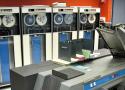
It might have the first-ever version of UNIX written in C
A tape-based piece of unique Unix history may have been lying quietly in storage at the University of Utah for 50+ years. The question is whether researchers will be able to take this piece of middle-aged media and rewind it back to the 1970s to get the data off.
4 days
jakeSilver badge
Reply Icon
Locking MollyGuards.
Available at a sparky supply shop near you; usually under $CURRENCY20 each. //
Sorry for Molly? Nah.
She has a story to tell that nobody else does.
Many moons ago I took my daughter to SLAC on take your kid to work day. At the ripe old age of 9, she had been there many times before and knew the ropes, but I figured she deserved a day out of school.
She told me as we were walking in that it'd cost me ten bucks for her to not push any buttons. I gave her the money.
On the way back out, I told her that it'd cost her ten bucks for me not to tell her mother she was running a protection racket. She made a face and paid up ... and promptly told her mother as soon as we got home. They both still laugh about it :-)

Here's exactly what made this possible: 4 documents that act as guardrails for your AI.
Document 1: Coding Guidelines - Every technology, pattern, and standard your project uses
Document 2: Database Structure - Complete schema design before you write any code
Document 3: Master Todo List - End-to-end breakdown of every feature and API
Document 4: Development Progress Log - Setup steps, decisions, and learnings
Plus a two-stage prompt strategy (plan-then-execute) that prevents code chaos. //
Here's the brutal truth: LLMs don't go off the rails because they're broken. They go off the rails because you don't build them any rails.
You treat your AI agent like an off-road, all-terrain vehicle, then wonder why it's going off the rails. You give it a blank canvas and expect a masterpiece.
Think about it this way - if you hired a talented but inexperienced developer, would you just say "build me an app" and walk away? Hell no. You'd give them:
- Coding standards
- Architecture guidelines
- Project requirements
- Regular check-ins
But somehow with AI, we think we can skip all that and just... prompt our way to success.
The solution isn't better prompts. It's better infrastructure.
You need to build the roads before you start driving.

Backblaze is a backup and cloud storage company that has been tracking the annualized failure rates (AFRs) of the hard drives in its datacenter since 2013. As you can imagine, that’s netted the firm a lot of data. And that data has led the company to conclude that HDDs “are lasting longer” and showing fewer errors. //
Biffstar Wise, Aged Ars Veteran
2y
152
My 320mb (megabyte) IDE IBM hard drive from 1994 still boots Win3.1 and loads Doom II just fine.
Who says older drives are unreliable?

New design sets a high standard for post-quantum readiness.
23 hrs
jakeSilver badge
Reply Icon
Re: If You Don't Patch Your Devices/Software, You're Begging For It
"When I first got into computing there was no such thing as patching"
You must be very old indeed ... Here's a photo of a patched Harvard Mk I program tape that has been patched:
https://upload.wikimedia.org/wikipedia/commons/f/fa/Harvard_Mark_I_program_tape.agr.jpg
One of the first jobs I had in computing partially involved physically cutting paper tape at the correct point(s), and then taping in either more code, or corrected code, or both, or occasionally undamaged paper with the original code after the tape got "eaten" by the machinery. The bits that got taped in were usually hand-punched. Yes, it was called "patching", for what I hope are obvious. //
21 hrs
that one in the cornerSilver badge
Reply Icon
Re: If You Don't Patch Your Devices/Software, You're Begging For It
Jacquard loom cards: sew them up in a different order to patch the pattern on the patch of material.
Ian JohnstonSilver badge
Reply Icon
Many (35?) years ago I had to use a PDP-11 running a copy of Unix so old that one man page I looked up simply said: "If you need help with this see Dennis Ritchie in Room 1305". //
Nugry Horace
Reply Icon
Re: Triggering a Specific Error Message
Even if an error message can't happen, they sometimes do. The MULTICS error message in Latin ('Hodie natus est radici frater' - 'today unto the root [volume] is born a brother') was for a scenario which should have been impossible, but got triggered a couple of times by a hardware error. //
5 days
StewartWhiteSilver badge
Reply Icon
Re: Triggering a Specific Error Message
VAX/VMS BASIC had an error message of "Program lost, sorry" in its list. Never could generate it but I liked that the "sorry" at the end made it seem so polite. //
Michael H.F. WilkinsonSilver badge
Nothing offensive, just impossible
Working on a parallel program for simulations of bacterial interaction in the gut micro-flora, I got an "Impossible Error: W(1) cannot be negative here" (or something similar) from the NAG library 9th order Runge-Kutta ODE solver on our Cray J932. The thing was, I was using multiple copies of the same routine in a multi-threaded program. FORTRAN being FORTRAN, and the library not having been compiled with the right flags for multi-threading, all copies used the same named common block to store whatever scratch variables they needed. So different copies were merrily overwriting values written by other copies, resulting in the impossible error. I ended up writing my own ODE solver
Having achieved the impossible, I felt like having breakfast at Milliways //
Admiral Grace Hopper
"You can't be here. Reality has broken if you see this"
Reaching the end of an error reporting trap that printed a message for each foreseeable error I put in a message for anything unforeseen, which was of course, to my mind, an empty set. The code went live and I thought nothing more of it for a decade or so, until a colleague that I hadn't worked with for may years sidled up to my desk with a handful of piano-lined listing paper containing this message. "Did you write this? We thought you'd like to know that it happened last night".
Failed disc sector. Never forget the hardware.

"If you bring a charged particle like an electron near the surface, because the helium is dielectric, it'll create a small image charge underneath in the liquid," said Pollanen. "A little positive charge, much weaker than the electron charge, but there'll be a little positive image there. And then the electron will naturally be bound to its own image. It'll just see that positive charge and kind of want to move toward it, but it can't get to it, because the helium is completely chemically inert, there are no free spaces for electrons to go."
Obviously, to get the helium liquid in the first place requires extremely low temperatures. But it can actually remain liquid up to temperatures of 4 Kelvin, which doesn't require the extreme refrigeration technologies needed for things like transmons. Those temperatures also provide a natural vacuum, since pretty much anything else will also condense out onto the walls of the container. //
Erbium68 Wise, Aged Ars Veteran
8m
1,829
Subscriptor
The trap and what they have achieved so far is very interesting. I have to say the mere 40dB of the amplifier (assuming that is voltage gain not power gain) is remarkable for what is surely a very tiny signal (and that is microwatts out, not megawatts).
But, as a practical quantum computer?
It still has to run at below 4K and there still has to be a transition to electronics at close to STP. The refrigeration is going to be bulky and power consuming. Of course the answer to that is to run a lot of qubits in one envelope, but getting there is going to take a long time.
We seem to have had the easy technological hits. The steam engine, turbines, IC engines, dynamos and alternators all came with relatively simple fabrication techniques and run at room temperature except for the hot bits. Early electronics began with a technical barrier - vacuum enclosures - but never needed to scale these beyond single or dual devices, and by the time that became a barrier to progress, transistors were already happening and it was then a matter of scaling size down and gates up. The electronics revolution happened at room temperature, maybe with some air cooling or liquid cooling for high powers.
Now we have the issue that getting a few gates to work needs a vacuum chamber at below 4K. Scaling is going to be expensive. And progress in conventional semiconductors will continue.
This approach may be wildly successful like epitaxial silicon technology. But it may also flop like the Wankel engine - the existing technology advancing faster than the initially complex and new technology can. //
dmsilev Ars Tribunus Angusticlavius
16y
6,561
Subscriptor
Erbium68 said:
The trap and what they have achieved so far is very interesting. I have to say the mere 40dB of the amplifier (assuming that is voltage gain not power gain) is remarkable for what is surely a very tiny signal (and that is microwatts out, not megawatts).
But, as a practical quantum computer?
It still has to run at below 4K and there still has to be a transition to electronics at close to STP. The refrigeration is going to be bulky and power consuming. Of course the answer to that is to run a lot of qubits in one envelope, but getting there is going to take a long time.
Compared to a datacenter computing system, it's actually not all that hugely power consuming. In rough numbers, 10-12 kW of electricity will get you a pulse tube cryocooler which can cool 50 or 100 kilograms of stuff down to about 4 K and keep it at that temperature with 1-2 W of heat load at the cold end. That's enough for a lot of 4 K qubits and first-stage electronics. Add in an extra kW for another pump and you can cool maybe 10 kg to ~1.5 K, with about 0.5 W of headroom. A couple more pumps at a kW or so each, some helium3 and a lot of expensive plumbing, and you have a dilution refrigerator, 20 mK with about 20-40 uW of headroom.
Compare that 10-15 kW with the draw from a single rack of AI inference engines.
Notion just released version 3.0, complete with AI agents. Because the system contains Simon Willson’s lethal trifecta, it’s vulnerable to data theft though prompt injection.
First, the trifecta:
The lethal trifecta of capabilities is:
- Access to your private data—one of the most common purposes of tools in the first place!
- Exposure to untrusted content—any mechanism by which text (or images) controlled by a malicious attacker could become available to your LLM
- The ability to externally communicate in a way that could be used to steal your data (I often call this “exfiltration” but I’m not confident that term is widely understood.)
This is, of course, basically the point of AI agents. //
The fundamental problem is that the LLM can’t differentiate between authorized commands and untrusted data. So when it encounters that malicious pdf, it just executes the embedded commands. And since it has (1) access to private data, and (2) the ability to communicate externally, it can fulfill the attacker’s requests. I’ll repeat myself:
This kind of thing should make everybody stop and really think before deploying any AI agents. We simply don’t know to defend against these attacks. We have zero agentic AI systems that are secure against these attacks. Any AI that is working in an adversarial environment—and by this I mean that it may encounter untrusted training data or input—is vulnerable to prompt injection. It’s an existential problem that, near as I can tell, most people developing these technologies are just pretending isn’t there.