
Part 2 There's a wealth of highly usable free software for the big proprietary desktop OSes. You can escape paying subscriptions and switch to free software without changing your OS.
In the first half of this short series, we looked at how to freshen up an aging Mac or Windows 10 PC, and ideally, how to wipe it and install a clean, bloat-free copy of its OS. That is all well and good, but this leaves the problem of what to put on that OS to get out of the trap of software you paid for but don't own. //
Compare OpenAlternative.co, which is snazzy and effects-heavy, with the decidedly low-tech Best FOSS Alternatives, which is very simple and austere. The latter has nothing to sell; it's just a plain, simple categorized list of FOSS tools. If you scroll to the end, it even has a short list of alternatives to itself. //
On a fresh new copy of Windows, the easiest way to get up and running is Ninite. https://ninite.com/


The current 25H2 build of Windows 11 and future builds will include increasingly more AI features and components. This script aims to remove ALL of these features to improve user experience, privacy and security.
Vellum is Mac-only software, but it is possible to use it by renting a Mac “in the cloud” that you can access via your PC.
This guide will walk you through using a service called MacinCloud. Currently, this service offers plans as low as $1 USD per hour. And once you are familiar with Vellum, creating your final files should take considerably less than an hour!
Practical steps to make an aging operating system usable into 2026
Part 1 You can switch to running mostly FOSS without switching to Linux. First, though, give your OS a bit of TLC. We'll come back to what to do next in part two. //
Before you begin, you should grab a copy of Snappy Driver Installer Origin and put it on a clean, empty USB key. Then run it, directly on the new key, and tell it to download all its driver packs. SDIO is the only driver-installer tool we trust and recommend. Don't pay for any alternative: indeed, we suggest you avoid anything else. SDIO is big – it takes quite a few gigabytes with all the driver packs or more – and takes a long time to download all the drivers, but it does the job. We've found it helpful from Windows XP all the way up to Windows 10.
Next, get a clean version of Windows. If you have the license key, you're all set. If you don't have your license key, then you can extract it from the running copy of Windows with Nirsoft ProduKey.
However, if you are willing to change versions, we suggest switching to Windows 10 LTSC. As we explained back in August, the Windows 10 Enterprise LTSC 2021 edition will get updates until 2027, and if you don't mind using US English, it'll last until 2032. As an added bonus, it's remarkably uncluttered – it doesn't even have the Windows Store, and so no "Modern" applications. Aside from Notepad, there's very little there at all, which is just how we like it. //
11 hrs
Liam Proven(Written by Reg staff) Silver badge
Reply Icon
Re: Windows 10 Enterprise LTSC 2021 edition?
This doesn't work on machines running Windows 10 Home though, does it?
Yes it does.
Read ALL OF https://massgrave.dev/ carefully. It is not a large site. //
11 hrs
Anonymous Coward
Anonymous Coward
The trick I find is to simply keep them offline (from installation, onwards).
This doesn't mean you can't use them to connect to the internet, but the OS as a whole must never be online. What I mean by this is i.e SOCKS5h proxy which only Firefox knows about. //
hrs
Jou (Mxyzptlk)Silver badge
Thanks for the article!
Snappy Driver and Ventoy were unknown to me, never needed them, but good to know and have those tools at hand.
As for my usual 10th-bazillion times repeated hint: Server 2022 and 2025, keys which activate are cheap, or use your favourite graveyard tool. Does not need a hacked-installer to not-annoy you. And has some nice features. like dedup, or setting a quota in a directory, or limit the file type / sizes, disconnected RDP sessions don't stop like on workstation Windows, they just work on, SMB Bandwidth control (nice for LAN parties, 'cause your game play is more important than those copy jobs). Well, and that's it, the rest of the server features/capabilities/roles are too esoteric for a workstaton install, or are already the same on normal Windows, except mins the crap you get on normal Windows.
If you want to install something from the store (manually, without account, like the Windows-Camera) or need bluetooth audio (read, never tested self on S2022) you are better off with Server 2025.
And you get updates long enough
Find & Remove Duplicate Files
You'd be surprised just how many duplicate documents, photos, music and other files build up on your computer. Duplicate Cleaner can find them and help you safely remove them: saving space and simplifying your life!

Dave Plummer, a former Microsoft engineer, says his lean original has grown roughly 50 times in size. Rather than critique today's version, Plummer took to his Dave's Garage YouTube channel to offer a window into Task Manager's scrappy origins, including the thought process behind its development, and his unfortunate decision to include his home phone number in the source code.
https://youtu.be/yQykvrAR_po //
Early Task Manager versions could bring Windows to its knees if users gave processes real-time priority or trigger Blue Screens of Death. But Plummer didn't see preventing user choices as his responsibility.
"I believe the operating system should be the arbiter of what's allowed, and that my job was not to second guess it."
Thirty years on, Task Manager endures. As for what was the most important line of code? It isn't a line, according to Plummer. It's a habit.
"It's the habit of eating your own dog food and accountability that says if a number is wrong or a window flickers, I take it personally until the fix ships. He added: "It's a product of a time and a culture that allowed ownership over time to translate into craftsmanship.
"It's the habit of assuming that the user is trying to accomplish some real work. Ship a build, make a flight, save a document, and my job is to just fix things and get out of the way.
"And it's the habit of resilience. If the tool itself gets stuck, revive it. If the system is starving, work in reduced mode," Plummer said. "If the user needs a chisel, don't give them a Nerf bat." ®
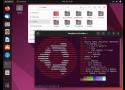
All the mainstream distros (Ubuntu and Mint, openSUSE and Gecko Linux, Fedora, Debian) come with largely the same choice of desktops, and they're all the same. //
I am also not saying that any of these environments are bad. I have my own preferences, but I completely respect that other people have their own. That's fine too.
That is not the purpose of this piece.
What it is asking is: why are they all the same?
So many different implementations of the "traditional" (since 1995) taskbar-and-launch-menu are not different desktops.
Yes, there are differences, but they are trivial and cosmetic. //
The hidden price of duplicated effort
A very important aspect of this is accessibility. Not only for blind users, but they make a good example. GNOME 2 was reasonably good for people without eyesight, but it's gone, and none of its inheritors come close to matching it.
An excellent and very simple test of accessibility is to use a desktop PC and just unplug the mouse. Windows remains highly usable with only a keyboard. As standard, without enabling any special accessibility aids, windows can be opened, moved, resized, switched and closed, entirely with the keyboard. //
The accessibility features and keyboard controls of macOS are not available at all until enabled, whereas in Windows, they are part of the standard UI, there for everyone to use. //
There are other designs out there. There are more desktops than Windows and macOS, and all offer their own unique benefits. Reimplementing the same old desktop model over and over again doesn't help anyone: it just wastes a huge amount of talent and effort. ® //
Tuesday 17th May 2022 08:55 GMT
DrXymSilver badge
The curse of overchoice
Overchoice is actually a term for when a consumer is given so many options, often varying in ways which are meaningless or confusing that they end up making no choice at all.
Linux has always had that issue and it is illustrated in the article in all the desktops that exist or existed. I expect most prospective Linux users just want to install the thing and use it for something. They really don't care what desktop is powering their experience providing it is easy to use, discoverable, familiar, doesn't throw any nasty surprises at them and lets them get on and do stuff.

There are an almost ridiculous number of Windows-style desktops on Linux – and mostly this applies to the BSDs, too. Most of them are implemented in C, and most use various versions of the Gtk toolkit for their widgets: menus, dialog boxes, buttons and so on.
In approximate age order, the ones still being maintained today are Xfce; MATE, which is a fork of GNOME 2; LXDE; Linux Mint's Cinnamon; and Budgie, implemented in the GNOME-centric Vala language. //
Now we're up to 23. We could dig deeper, but we hope that we've made the point by now. There are several different languages here (but a lot fewer than 23 of them), and several different graphical toolkits (but again, well under 20). This is a vast amount of effort spent reinventing, and then maintaining, the basic concept of a round thing on the end of an axle.
But the underlying concept here is really quite a simple one. The window managers can't match the functionality of the Windows 95 Explorer, and not one of the desktops captures the simple elegance of the original. Windows 95 let you put the taskbar on any screen edge, but you only got one, and you couldn't change its length, or re-arrange or resize its contents, let alone change their orientation. Multiple rows was your only option. //
Remember the Basics of the Unix Philosophy:
Write programs that do one thing and do it well. Write programs to work together. Write programs to handle text streams, because that is a universal interface.
That 1995 design was simple. The components of the desktop – the task bar, the file manager, the text editor, and so on – don't need to exchange lots of rich, complex messages. //
Nearly two dozen different Windows-like UIs represents a titanic waste of programmer effort, skill, and time. Hundreds, maybe thousands of people, working hard for decades… but all on different projects, meaning that none of them achieve greatness. For an example, look at KDE Plasma's 36 launcher menus.
It is 27 years since the first release of KDE, and I suspect that Microsoft has been laughing all the way to the bank ever since. The FOSS world can do better, and it's time it started to try. ®

Archaeologic Microsoft veteran Raymond Chen has shared the origin story behind the Windows 3D Pipes screensaver.

Respecting users choices and offering a hardcore mode among key suggestions.
Retired Microsoft engineer Dave Plummer has waded into the argument over where Microsoft has gone wrong with Windows, suggesting that perhaps the OS needs a hardcore mode to offset some of its fluffier edges.
Plummer comes from what was arguably a golden era for the Windows operating system: the final days of Windows NT 3.5x and the advent of Windows NT 4. Although it has been decades since he was last involved in the Windows codebase, his code can likely still be found in the OS, in part, due to the blessing and curse of Windows's obsession with backward compatibility.
Plummer's complaints boil down to two main areas: a desire for a hardcore mode that optionally removes all the fluffiness added to the operating system for the benefit of non-technical users, and a combination of transparency and an end to the 'Microsoft knows best' attitude that has plagued recent releases. //
2 days
DoctorNine
Reply Icon
Re: He is so right
With Windows 10, you could mostly stop the dog chewing on itself by constructing a registry cone around its head. Windows 11 though, is M$'s latest attempt to ensure we are unable to stop it gnawing a hole in its rear end, and not only that, there are freaking cameras in the room to record us even trying to do so. I can't even. //
1 day
vtcodgerSilver badge
Reply Icon
Re: I watched the video. He's basically describing Linux.
The Windows registry would require comprehensive documentation -- which it doesn't have, has never had, and probably will never have -- to even begin to approach the utility of the Unix application specific configuration files. //
ParlezVousFranglaisSilver badge
Happy
If O/Ss were airlines - for those who've never seen it...
https://www.webaugur.com/bibliotheca/field_stock/os-airlines.html. //
https://www.oo-software.com/en/shutup10
https://github.com/Open-Shell/Open-Shell-Menu/releases/tag/v4.4.196
A new major Windows 11 release means a new guide for cleaning up the OS.

To get this new Start menu, you must be running build 26100.7019 or 26200.7019 or newer versions of Windows 11. Make sure you have all the latest updates installed by going to Settings->Windows Update and clicking the Check for updates button. You can check your Windows build number by hitting Windows+R to open the run prompt and running winver. //
If you have the right build number, it’s possible that the new Start menu will appear on its own. But, if not, you can use the ViveTool, a utility that enables hidden Windows features, to turn it on.
First, download the ViveTool and unzip it to C:\vive. Then open a command prompt as an administrator and change into that directory.
cd c:\viveFinally, issue the following command:
vivetool /enable /id:57048231,47205210,56328729,48433719RSAT tools can be installed using the built-in Windows DISM tool. As an example, run the following command in an elevated command prompt to install the RSAT Group Policy Management Tools, RSAT Active Directory Domain Services and Lightweight Directory Services Tools and RSAT DNS Server Tools.
dism /online /add-capability /CapabilityName:Rsat.GroupPolicy.Management.Tools~~~~0.0.1.0 /CapabilityName:Rsat.Dns.Tools~~~~0.0.1.0 /CapabilityName:Rsat.ActiveDirectory.DS-LDS.Tools~~~~0.0.1.0 
Affected users have found relief by often uninstalling KB5066835 alongside KB5065789 using command line tools like wusa.exe, followed by a restart.
Alternative workarounds include disabling HTTP/2 through registry edits under HKEY_LOCAL_MACHINE\SOFTWARE\Microsoft\IIS\Parameters or updating Microsoft Defender Antivirus definitions via KB2267602, which resolves the issue without full rollback in some cases.
Fresh Windows 11 installations appear immune, suggesting the error stems from interactions with existing setups rather than a core flaw.
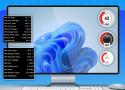
- Rainmeter is a free, open-source app for highly customizable Windows desktop widgets.
- Skins (.rmskin/.ini) and community sites like DeviantArt let you mix, edit, and share themes.
- Edit skins via Rainmeter UI or .ini files to tweak position, fonts, icons, and interactions pixel-perfectly.
Turn Down or Disable Visual Effects
Next, you need to adjust the Windows visual effects to improve your system's overall performance. To do this, open the Start menu, type Adjust the appearance and performance of Windows, and press Enter. In the Performance Options window, select "Adjust for Best Performance," and then click "Apply" and "OK."
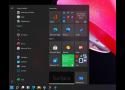
You’ll need to go to the Windows 11 Start menu, type Registry Editor, and then step through the folder file tree much like you’d do in the Windows 10 Settings menu. Here’s the directory you’re looking for: HKEY_CURRENT_USER\Software\Microsoft\Windows\CurrentVersion\Explorer\Advanced
Once you’ve entered the “Advanced” folder, right-click to create a “New” DWORD (32-bit) Value.
Name it Start_ShowClassicMode. Then right-click that value, select Modify, and set the “Value Data” to 1. You’ll then need to restart your computer.
Microsoft has removed the classic calculator app starting in Windows 10 and replaced it with a new UWP app that receives updates from the Store. Many people aren't happy with this change. The classic app loaded faster, and was more useful for mouse and keyboard users. Here you can get the classic calculator back in Windows 11 and Windows 10.

A small and fast Windows screensaver featuring the green "Matrix" cipher-code seen in the popular films by the same name, directed by Andy and Lana Wachowski and starring Keanu Reeves, among others. Optionally, you can add messages to be decoded and displayed in real-time.

If you’re trying to debloat Windows 10 or 11, you’re probably wondering which tool to use. Try Win11Debloat, an open-source & easy-to-use one-line tool; download it now.