
Let's face it, most of us buy NAS drives on faith. I certainly did, and every hard drive in my NAS is a NAS or enterprise model because that's what you're told to put in one. Ask why, and the answer often comes back as a single firmware timeout that determines how long a drive keeps fighting a bad sector before it gives up. It's not the only specification you should pay attention to, but it's an important one for when using RAID.
That timeout goes by three names: TLER on WD drives, ERC on Seagate, and CCTL on Samsung and Hitachi. It's been a spec-sheet bullet since WD's RE4 server drive advertised it in 2009, and it's a big reason people tell you to buy the best hard drives for NAS instead of whatever's cheapest. So I asked my own drives what they were set to, and the number wasn't the one I expected.
Picture a drive hitting a sector it can't read cleanly. A desktop drive will keep rereading it, adjusting and retrying, because it assumes it holds the only copy of your data and giving up means losing it. That's the right call for a lone drive in a PC, and it's why desktop drives have traditionally shipped with the limit switched off.
In an array, that stubbornness backfires. Once you set up RAID in a NAS, another copy of that data sits on a different drive, and the array would rather rebuild the sector from there than wait. Hardware RAID controllers drop a drive that stalls past their command timeout, while Linux waits 30 seconds by default before resetting a drive that's gone quiet. A time-limited drive gives up early, reports the error, and lets the array fix it, saving you time and your data.
sudo smartctl -l scterc /dev/sde remembering that smartctl counts in tenths of a second:
sudo smartctl -l scterc,70,70 /dev/sde

Gokapi is a lightweight server to share files that expire after a set number of downloads or days. It is similar to the discontinued Firefox Send, with the difference that only authenticated users are allowed to upload files — anonymous visitors can only download.
This lets companies or individuals share files easily and have them removed automatically afterwards, saving disk space and keeping control over who can access the content.
Key features:
-
Expiring links — files are deleted after a configurable number of downloads or after a set number of days
-
File Requests — generate a link that lets external users upload files to your server
-
Multi-user support — multiple accounts with granular per-user and per-API-key permissions

Backup Service Offers
Free
- 10GB storage
- 1 device
- 7-day retention
- $0/month, no card required
Starter
- 200GB storage
- 1 device
- 30-day retention
- Coupon: LEB25
- $3.75/month or $45/year (prices after coupon)
In order to completely avoid the write hole, you need to provide write atomicity. We call the operations which cannot be interrupted in the middle of the process "atomic". The "atomic" operation is either fully completed or is not done at all. If the atomic operation is interrupted because of external reasons (e.g. a power failure), it is guaranteed that a system stays either in original or in final state.
In a system which consists of several independent devices, natural atomicity doesn't exist. Variance of mechanical hard drives characteristics and data bus particularities don't allow to provide required synchronization. In these cases, transactions are typically used. Transaction is a group of operations for which atomicity is provided artificially. However, expensive overhead is required to provide transaction atomicity. Hence, transactions are not used in RAIDs.
One more option to avoid a write hole id to use a ZFS which is a hybrid of a filesystem and a RAID. ZFS uses "copy-on-write" to provide write atomicity. However, this technology requires a special type of RAID (RAID-Z) which cannot be reduced to a combination of common RAID types (RAID 0, RAID 1, or RAID 5).

The Trilogy Nobody Wanted
Let me be real about what this three-part series documents:
Part 1: A cloud provider deletes a decade of work because of a broken verification process and a Java parameter parsing quirk. Support gaslights the customer for 20 days.
Part 2: One human inside the machine fights the bureaucracy, escalates to the CEO, and restores the account. Hope restored. Faith in humanity renewed.
Part 3: That human gets fired. The systemic issues remain unfixed. The machine continues.
This is the arc of modern tech. The system breaks. A human fixes it despite the system. The system removes the human. Repeat.
The Real Lesson
In Part 2, I wrote: “My trust isn’t fully restored. What is restored is my faith that even in massive corporations, one person can make a difference.”
I still believe that. But I’ll add a corollary: the difference that person makes is often inversely proportional to how long the corporation keeps them around.
The people who challenge broken systems, who go off-script, who escalate when the template says “close the ticket”. Those people are threats to institutional inertia. They’re expensive. They’re inconvenient. They make leadership answer uncomfortable questions.
And eventually, they get optimized away. Just like a “low-activity” AWS account.
A Note to AWS
You don’t need me to tell you this, but I will anyway: Tarus Balog was worth more to your reputation than any GenAI keynote. Every developer who read my story and thought “maybe AWS isn’t so bad after all”? That was because of him. Not your PR team. Not your marketing budget. One human being who decided to do the right thing.
You’ll replace him with someone who hits KPIs and doesn’t ask uncomfortable questions. And you’ll wonder why developers keep building exit strategies from your platform. //
To AWS: You had a human circuit breaker. You removed it. Good luck with the next cascade failure.
To everyone else: Keep your backups distributed. Keep your exit strategies current. And if you find a Tarus inside your cloud provider, thank them before the system optimizes them away.

Remember my article about AWS deleting my 10-year account? The one where support gaslit me for 20 days while claiming my data was “terminated”?
Here’s the plot twist: My data is back. Not because of viral pressure. Not because of bad PR. But because one human being inside AWS decided to give a damn.
This is that story.

I’d done everything right. Vault encryption keys stored separately from my main infrastructure. Defense in depth. Zero trust architecture. The works.
My security posture was textbook—protect against compromise by ensuring no single failure could take down everything. What I hadn’t protected against? AWS itself being the single point of failure.
I built a hardened bunker with multiple escape routes, only to have AWS drop a nuke on the entire complex. //
You might be thinking, “What are the odds they target me?” But that’s the wrong question. I thought the same thing—with my level of exposure and contributions, surely they could just write my name down and not bother me with stupid verification requests about whether I exist.
But you’re not being targeted—you’re being algorithmically categorized. And if the algorithm decides you’re disposable, you’re gone. //
After 20 days of appeals, AWS support finally responded with this gem: “Because verification wasn’t completed by the due date, your resources were terminated.”
But here’s the dilemma they’ve created: What if you have petabytes of data? How do you backup a backup? What happens when that backup contains HIPAA-protected information or client data? The whole promise of cloud computing collapses into complexity.
This isn’t a system failure. The architecture and promises are sound. AWS doesn’t lose data—they have backups of backups of backups, stored in vaults that last far longer than the stated 90 days, where no rogue AI script can reach.
What’s happening here is simpler: teams in MENA are trying to cover up a massive fuck-up. Restoring data from those deep vaults would require explanations. Incident reports. Post-mortems. “Why did we have to open the vaults?”
Their entire communication strategy screams: “He’s nobody. He’ll give up soon. We won’t have to report this up the chain.” //
Lessons Learned
- Never trust a single provider—no matter how many regions you replicate across
- “Best practices” mean nothing when the provider goes rogue
- Document everything—screenshots, emails, correspondence timestamps
- The support theater is real—they literally cannot help you
- Have an exit strategy executable in hours, not days
AWS won’t admit their mistake. They won’t acknowledge the rogue proof of concept. They won’t explain why MENA operates differently. They won’t even answer whether your data exists.
But they will ask you to rate their support 5 stars.
The cloud isn’t your friend. It’s a business. And when their business needs conflict with your data’s existence, guess which one wins?
Plan accordingly.

Yet another remote desktop solution, written in Rust. Works out of the box with no configuration required. You have full control of your data, with no concerns about security. You can use our rendezvous/relay server, set up your own, or write your own rendezvous/relay server.
OpenBMC is a Linux distribution for management controllers used in devices such as servers, top of rack switches or RAID appliances. It uses Yocto, OpenEmbedded, systemd, and D-Bus to allow easy customization for your platform.
Current probe locations are listed below. They are also listed in this handy text file and can be accessed via DNS query to probes.nodeping.com for automating your firewall rules if needed.
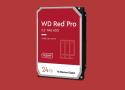
Struggling to tell the difference between WD’s NAS HDDs? This will help.
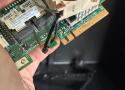
Tucked into the PCIe slot, alongside the high-speed data lanes everyone thinks about, sits a tiny, slow side-channel called the SMBus. It's a management bus, and it exists for housekeeping like reading a sensor or identifying a card, not for moving your data.
My HBA and my motherboard were both trying to use that bus during the earliest moments of POST, and they were stepping on each other badly enough to stall the whole boot. This doesn't happen to every card and motherboard combo, but it's common with specific LSI cards in consumer motherboards. My workstation PC would boot just fine with the card installed, which really confused me until I found a very informative video from Art of Server, showing a tape mod for my specific card and describing the failure mode I was experiencing. //
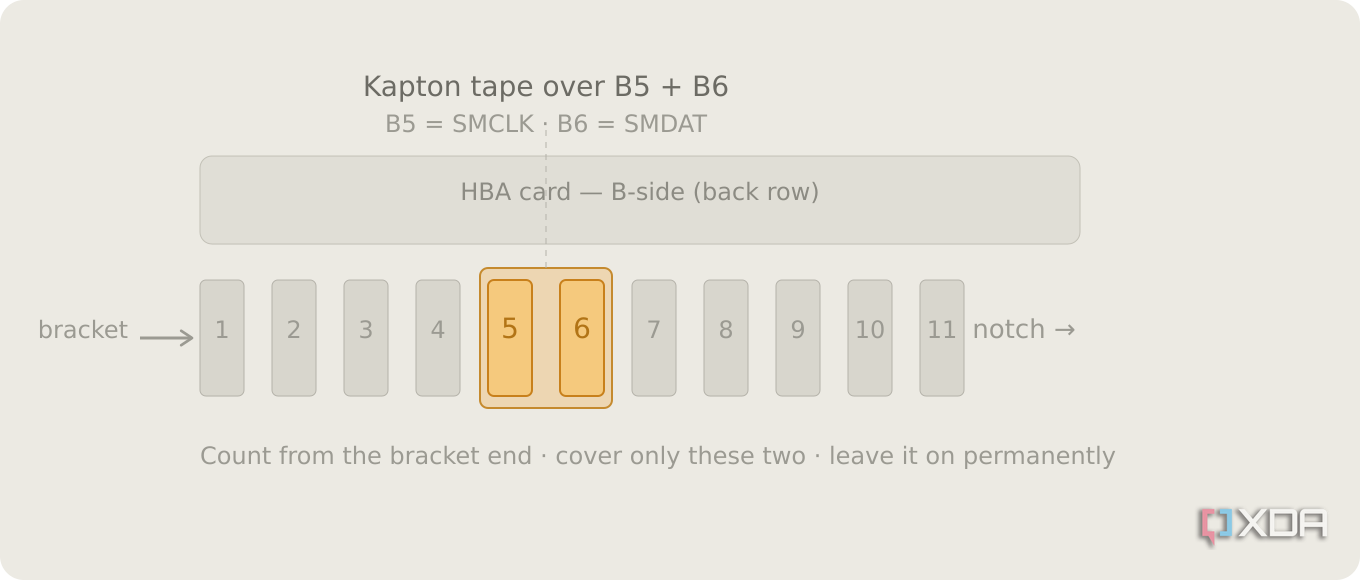
The two SMBus pins on the connector, positions B5 and B6, are defined by PCI-SIG as optional, with no required behavior for whatever an add-in card hangs off them. Simply covering these two pins on the card solves the conflict that happens at boot time. Kapton tape is the preferred material to do this, but I used normal electrical tape to good effect.
https://www.youtube.com/watch?v=HBnNaheYmdA
https://static0.xdaimages.com/wordpress/wp-content/uploads/wm/2026/06/smbus-tape-mod-hba-card.png

Enterprise storage has traditionally required costly licensing, proprietary hardware, and complex management. ENAS changes that by delivering a private, local storage platform designed for performance, scalability, and simplicity, all without the overhead typically associated with enterprise infrastructure.
ENAS combines proven ZFS architecture, with optional M.2 NVMe L2ARC caching, and a powerful ARM Neoverse N2 platform to make our highest performance storage solution to date.
- 8 Arm Neoverse N2 cores for demanding workloads
- 64GB ECC memory for enhanced data integrity
- Dual NVMe cache for accelerated performance
- Native ZFS for advanced storage protection
As a Linux server administrator, having a reliable email notification system in place is crucial. Whether you’re dealing with unattended upgrades, monitoring RAID arrays, or any other server-related alerts, getting quick notifications can make a world of difference. Here’s a quick guide to setting up sSMTP, a lightweight and straightforward alternative to postfix or other full-fledged mail transfer agents (MTAs).
Why sSMTP instead of postfix?
sSMTP is lightweight, easy to configure, and perfect for scenarios where you just need outgoing email functionality. It’s particularly well-suited for sending notifications from Linux servers without the overhead of a fully-fledged MTA like postfix.
PikaPods helps you run the best open source apps with just a few clicks.
Your Personal App Box
Syncloud device runs your apps at your premises
To ensure that we can maintain the highest standards of service and support, we offer a £5 monthly subscription after a free one-month trial period. This nominal fee allows us to continue enhancing our platform and providing you with the ongoing assistance you need to maintain your digital autonomy. With Syncloud, your data remains your own, and your digital journey stays firmly in your hands. Use your domain name or ours at syncloud.it

Setting up and securing Roundcube and going forward into a self-hosted future.

We load up OpenDKIM, SpamAssassin, ClamAV, and get Sieve filtering operational.

Gmail? Apple? The cloud? Forget ’em all—in this series, we take your e-mail back.

Our self-hosting e-mail series continues as we get our ducks—and doves—in a row.