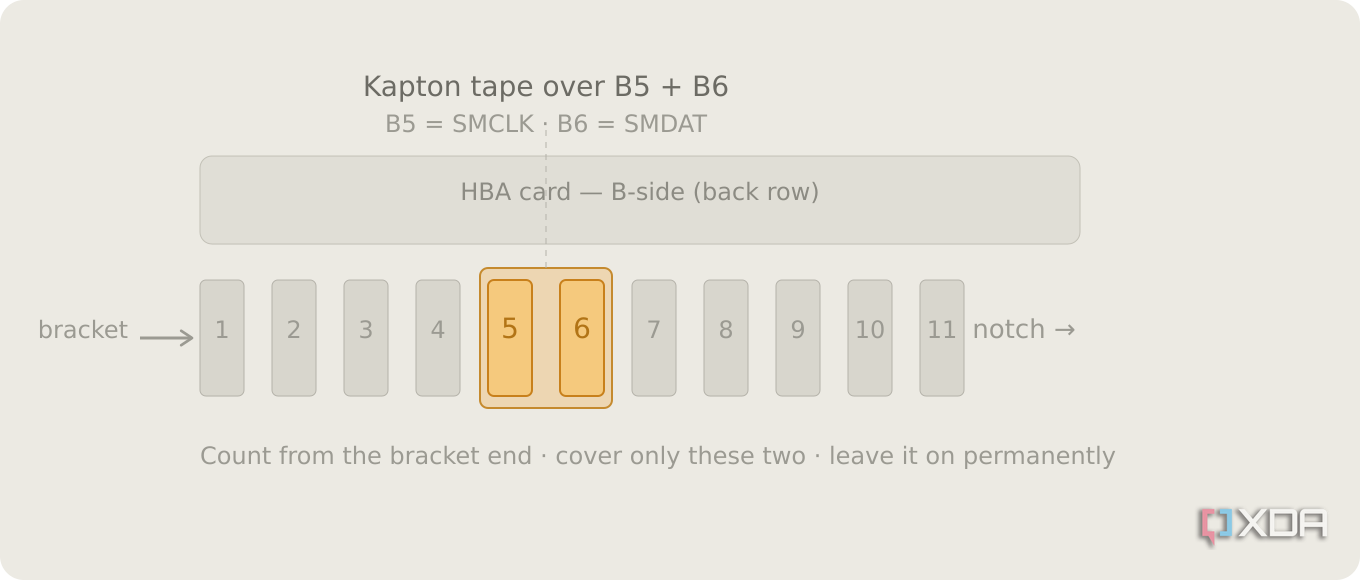
Tucked into the PCIe slot, alongside the high-speed data lanes everyone thinks about, sits a tiny, slow side-channel called the SMBus. It's a management bus, and it exists for housekeeping like reading a sensor or identifying a card, not for moving your data.
My HBA and my motherboard were both trying to use that bus during the earliest moments of POST, and they were stepping on each other badly enough to stall the whole boot. This doesn't happen to every card and motherboard combo, but it's common with specific LSI cards in consumer motherboards. My workstation PC would boot just fine with the card installed, which really confused me until I found a very informative video from Art of Server, showing a tape mod for my specific card and describing the failure mode I was experiencing. //
The two SMBus pins on the connector, positions B5 and B6, are defined by PCI-SIG as optional, with no required behavior for whatever an add-in card hangs off them. Simply covering these two pins on the card solves the conflict that happens at boot time. Kapton tape is the preferred material to do this, but I used normal electrical tape to good effect.
https://www.youtube.com/watch?v=HBnNaheYmdA
https://static0.xdaimages.com/wordpress/wp-content/uploads/wm/2026/06/smbus-tape-mod-hba-card.png