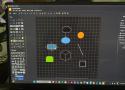
When I first opened draw.io, I honestly wasn't expecting much. The interface looked clean and fairly basic. There wasn't a lot happening on the screen, and I initially wondered whether I had found a proper Visio alternative or just another lightweight diagramming tool.
I decided not to judge it too quickly and spent a little time exploring the interface. That was when I started noticing that simplicity was actually one of its strengths. //
After spending enough time with draw.io, I stopped thinking about what I was missing from Visio. Instead, I started focusing on what I could actually get done with it. That shift made a bigger difference than I expected.


Scribus is the Go-To Libre Desktop Publishing Application.
Scribus is a libre page layout program for almost every operating system
Welcome to Scribus, a page layout program for Linux, Windows, macOS, many current UNIX and *BSD systems, OS/2 Warp 4 and variants, as well as Haiku.
Since its humble beginning in the spring of 2001, Scribus has evolved into one of the premier Open Source desktop applications. Encouraged by professionals and beginners alike, the Scribus Team, with support from a large and growing number of enthusiastic contributors from all over the world, is dedicated to develop and improve “one of the most powerful and useful open-source projects out there” (TechRepublic). The leading German IT website heise.de listed Scribus as one the of the best Open Source programs available.

Say Goodbye to Microsoft Publisher. Try These 8 Alternatives Before It Disappears Next Month | PCMag
The end of Microsoft Publisher is near. I've tested the top alternatives, and here's what I recommend for both pro and beginner designers.

From Waterfox to LibreWolf and Pale Moon, there's a browser for almost every Mozilla dissenter
Pale Moon – The Private, Secure and Fully Customizable Open Source Web Browser
If you’re looking for a fully non-commercial alternative to Chrome that respects your privacy, Pale Moon is built for you.
Pale Moon is an Open Source web browser built on its own maintained platform and rendering engine (Goanna™), available for various operating systems including Microsoft Windows, Mac OS and Linux (with community-contributed support for other operating systems), focusing on customization, security, privacy and extensibility.
Basilisk is considered stable software. This means it does not change for the sake of change. Updates are made deliberately, with an emphasis on maintaining existing workflows and minimizing unnecessary disruption.
If you want a browser that works consistently and respects established workflows, Basilisk may be a good fit.
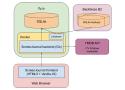
A good design doc can save you years of development time. Writing a design doc forces you to think through important decisions before you waste time on the wrong implementation. It’s also the best way to coordinate design decisions among teammates and partner teams.
I’ve written design docs as a developer at Google, Microsoft, and within my own companies. The specifics vary, but the underlying principles remain the same. A design doc articulates the hard problems you’re solving and helps your teammates give you feedback.
Below, I share my approach to creating effective design docs and explain what belongs in a design doc and what does not.
Jonathan Richards 1Silver badge
Reply Icon
Re: Ooh cms
Upvoted. Librarianship 101, or the correct principles for an office filing system which brought myriads of companies successfully through generations of business and progress. The oldest of those companies have curated archives that you can still find documents in. Good luck with that in a hundred years for any of the software solutions kicking around now.
The nightmare began when we stopped filing things in carefully chosen places, or alternatively carefully indexing things placed in a managed store. Some clown thought that having a list of all the words in all the documents would make it easy to find what one was looking for. Repeat after me: the set of words in a document does not tell you what the document is about. cf Manila and manila!
Freedom to build what you want
FreeCAD is an open-source parametric 3D modeler made primarily to design real-life objects of any size. Parametric modeling allows you to easily modify your design by going back into your model history and changing its parameters.
Create 3D from 2D & back
FreeCAD allows you to sketch geometry constrained 2D shapes and use them as a base to build other objects. It contains many components to adjust dimensions or extract design details from 3D models to create high quality production ready drawings.
For professional design needs...
FreeCAD is a powerful and evolving open-source parametric 3D modeler, well-suited for many professional and technical tasks. Each new release marks a milestone in stability and usability. FreeCAD puts you in control - no licensing fees, no vendor lock-in. It's not just cost-effective - it’s yours to adapt and build upon.
...And for everything else
Whether you're prototyping, 3D printing, designing furniture, or learning CAD, FreeCAD offers the tools to support your creativity. With a strong community, extensive documentation, and a growing ecosystem of add-ons, it’s a great place to start - and to grow. No sign-up, no paywall, no restrictions. Just open-source freedom at your fingertips.
Gokapi is a lightweight server to share files that expire after a set number of downloads or days. It is similar to the discontinued Firefox Send, with the difference that only authenticated users are allowed to upload files — anonymous visitors can only download.
This lets companies or individuals share files easily and have them removed automatically afterwards, saving disk space and keeping control over who can access the content.
Key features:
-
Expiring links — files are deleted after a configurable number of downloads or after a set number of days
-
File Requests — generate a link that lets external users upload files to your server
-
Multi-user support — multiple accounts with granular per-user and per-API-key permissions
Baba Computer
Dr. Anthony Petrillo
For my students, friends, and family.
Owls is just entering this market — not chasing a fortune, but looking for customers we can serve well and get to know. Find out what we have, and see if we're a fit for you.
You have my team's personal invitation, and our promise to do our best to serve you.
— Dr. Anthony Petrillo, CEO

Coming together to write code, save lives. Because better records support better healthcare.
The future of enterprise software is open-source
Proprietary ERPs are expensive, limiting, and rigid. Businesses are left with two choices, either spend through the roof on SAP, Oracle NetSuite, etc., or use multiple disconnected apps leading to manual work, poor visibility, and broken traceability. What if there is a better way?
ERPNext is a 100% open-source enterprise resource planning software with a modern, comprehensive, and user-friendly Enterprise Resource Planning (ERP) solution. We don't have any features hidden behind expensive paywalls. Everything is yours to use, modify, or resell giving you full freedom, control, and flexibility.
21st Century Solutions for
Frontline Clinics
Transforming healthcare where people need it most.
Clinics
201
Patent visits per year
1,200,000
Donate to transform lives
Subscribe to our newsletter
BandaGo is a cloud-based digital solution that lets clinics get the most out of their available resources.
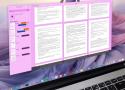
This simple (yet very effective) tool allows you to add documents, move the documents (to organize them), search them (by title or even within the body), export them, add keywords and labels to documents, view document properties, search by keyword(s), and change the document view. //
The Paperwork feature list includes scanner support, PDF support, auto-detection of page orientation, OCR, document labels, auto-guessing of labels to apply to new documents, search, keyword suggestions, and quick scan edits.
Paperwork is free and can be installed on any Linux distribution and even Windows.
XScreenSaver
a collection of
free screen savers
for X11, Wayland,
macOS, iOS and
Android
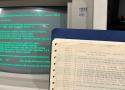
Microsoft continues to make some of the earliest chapters of its operating system history open-source and freely available. Earlier this week, it announced that Tim Paterson's DOS listings, containing source code of the 86-DOS 1.00 kernel, various PC-DOS 1.00 pre-release kernels and utilities, and the Microsoft BASIC-86 Compiler runtime library, were available on GitHub. Microsoft VP Scott Hanselman tied the release to 86-DOS 1.00’s 45th anniversary. The exec confirmed that the code, transcribed from reams of old dot matrix printouts found in a garage, was perfect, "and recompiles byte for byte to the original binaries.”
Scanner
age is a simple, modern and secure file encryption tool, format, and Go library.
It features small explicit keys, post-quantum support, no config options, and UNIX-style composability.