
I recently ordered a bunch of new Stemma QT devices including the Adafruit ESP32-S3 Reverse TFT Feather and a MLX90640 IR camera module that I wanted to turn into a DIY thermal camera. I wanted it to be small and battery powered.
In this guide I’ll show you the parts I used to build it as well as the code. Let’s get started!



Part 2 There's a wealth of highly usable free software for the big proprietary desktop OSes. You can escape paying subscriptions and switch to free software without changing your OS.
In the first half of this short series, we looked at how to freshen up an aging Mac or Windows 10 PC, and ideally, how to wipe it and install a clean, bloat-free copy of its OS. That is all well and good, but this leaves the problem of what to put on that OS to get out of the trap of software you paid for but don't own. //
Compare OpenAlternative.co, which is snazzy and effects-heavy, with the decidedly low-tech Best FOSS Alternatives, which is very simple and austere. The latter has nothing to sell; it's just a plain, simple categorized list of FOSS tools. If you scroll to the end, it even has a short list of alternatives to itself. //
On a fresh new copy of Windows, the easiest way to get up and running is Ninite. https://ninite.com/

FreeSewing is open source software to generate bespoke sewing patterns, loved by home sewers and fashion entrepreneurs alike.
Industry sizing is a bunch of lies. Join the slow fashion revolution and enjoy clothes that fit you.
- Pick Any Design
- Add a set of measurements
- Customize your pattern
The current 25H2 build of Windows 11 and future builds will include increasingly more AI features and components. This script aims to remove ALL of these features to improve user experience, privacy and security.
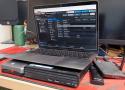
But ZFS also comes with an uncomfortable truth that doesn't get talked about enough: the filesystem is only as good as the operating system wrapping it. And if you're running ZFS on a generic Linux distribution, you're often signing up for more risk, maintenance, and subtle breakage than you expect. ZFS works on Linux, and many use it daily, but it's not a seamless, built-in part of the kernel. Instead, it's an add-on with caveats, and setting it up can feel frustratingly difficult. //
The problem with ZFS is Oracle
Licensing is a major issue
the Linux kernel's GPLv2 license is legally incompatible with ZFS's CDDL license, meaning that it can't be combined with the Linux kernel. Oracle's licensing is the major bottleneck.
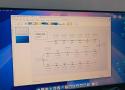
Joplin
A handy OneNote alternative
OpenCloud
Say goodbye to OneDrive
OnlyOffice
An excellent office suite
Syncthing
To sync your local folders

Czkawka is more than just a dupe finder
It has a comprehensive tool set with a wide range of applications
Czkawka's main purpose is to find duplicate files, but it offers a variety of methods for doing so. The Duplicate File Finder feature allows you to check files not only by hash, but also by size, name, or both. And if you search by hash, you can choose between Blake3, CRC32, and XXH3. When I put the app to the test, it turned up a slew of duplicates in my downloads folder (of course) and quite a few in my documents.
But that's not all it can do. I can search specifically for big files, empty folders (which I found a surprising number of), similar images and videos, and even duplicates of music. Each search is customizable, too, allowing more granular control over the results.

OpenCloud
Immich
Vaultwarden
Docmost
HomeBox
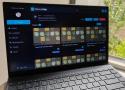
What is HomeBox?
Inventory management for regular people
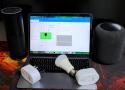
Homebox
Keeping track of everything I own
Home Assistant
My smart home’s true brain
Nextcloud
My digital filing cabinet
Firefly III
Building a stable financial home
KitchenOwl
My personal kitchen companion
Homarr
Bringing all my apps together

Direct, encrypted file transfers from your computer to anyone, anywhere — no signup, no cloud storage in between.
Think of it like AirDrop for everyone.
GitHub
Free & Open source
Portable file server with accelerated resumable uploads, dedup, WebDAV, FTP, TFTP, zeroconf, media indexer, thumbnails++ all in one file, no deps

Windows command line utility to compute hash of directories and files - idrassi/DirHash
Possible values for HashAlgo (not case sensitive):
- MD5
- SHA1
- SHA256
- SHA384
- SHA512
- Streebog
- Blake2s
- Blake2b
- Blake3
- Any combination of the above separated by comma, except when -verify is used
If HashAlgo is not specified, Blake3 is used by default.
ResultFileName specifies an optional text file where the result will be appended.
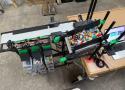
You know what’s not fun? Sorting LEGO. You know what is fun? Making a machine to sort LEGO! That’s what [LegoSpencer] did, and you can watch the machine do its thing in the video below. //
If you want to build your own, you might want to track the new Sorter V2 that is under development. If you are building V1, you can find what you need on GitHub.
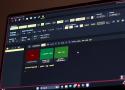
The entire file server and all its features are compressed into one Python file. Drop the file into the root directory of the drive you want to use, and run it to start the server. That's it.
You can run it almost anywhere, including Linux, macOS, Windows, Android, and even Raspberry Pi. You can choose to run it with or without Docker, and the whole setup is incredibly portable. Yes, you can build your own Raspberry Pi cloud server with Nextcloud, but it won't get nearly the performance you would with Copyparty.
The simplicity also extends to what Copyparty actually does. It's a web-based file server where you can upload, download, share, and store files for as long as you need. No extra email clients, calendar apps, or fancy collaborative editing features. Just a simple file server that lets you manage your files with ease.
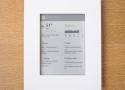
I’ve found myself wanting a less intrusive channel for ambient data. Something I can glance at in passing, without giving my full attention or opening myself up to whatever other interruptions my phone might have in store. It should be easy to check, but just as easy to ignore.
This is the device I landed on: a wifi-connected Kindle 4, mounted on the wall in a simple laser-cut acrylic frame. Once a minute, it loads a screenshot of a web page I built that shows a few different kinds of data I want easy access to: calendar events, weather, the status of packages I’ve ordered, etc.

Let’s be honest, it’s time to move on from TeamViewer for remote access. Once dominant, it’s showing its age while the open-source contenders have caught up fast. These modern alternatives are faster, more flexible, and customizable. Additionally, you won’t feel the pinch in your wallet with subscriptions and restrictive licensing terms.

➤ You, the consumer, purchased your Android device believing in Google’s promise that it was an open computing platform and that you could run whatever software you choose on it. Instead, starting next year, they will be non-consensually pushing an update to your operating system that irrevocably blocks this right and leaves you at the mercy of their judgement over what software you are permitted to trust.

Shortly after our post was published, Google aired an episode of their Android Developers Roundtable series, where they state unequivocally that “sideloading isn’t going anywhere”. They follow-up with a blog post:
Does this mean sideloading is going away on Android? Absolutely not. Sideloading is fundamental to Android and it is not going away.
This statement is untrue. The developer verification decree effectively ends the ability for individuals to choose what software they run on the devices they own.
It bears reminding that “sideload” is a made-up term. Putting software on your computer is simply called “installing”, regardless of whether that computer is in your pocket or on your desk. This could perhaps be further precised as “direct installing”, in case you need to make a distinction between obtaining software the old-fashioned way versus going through a rent-seeking intermediary marketplace like the Google Play Store or the Apple App Store.
Regardless, the term “sideload” was coined to insinuate that there is something dark and sinister about the process, as if the user were making an end-run around safeguards that are designed to keep you protected and secure. But if we reluctantly accept that “sideloading” is a term that has wriggled its way into common parlance, then we should at least use a consistent definition for it. Wikipedia’s summary definition is:
the transfer of apps from web sources that are not vendor-approved
By this definition, Google’s statement that “sideloading is not going away” is simply false. //
You, the consumer, purchased your Android device believing in Google’s promise that it was an open computing platform and that you could run whatever software you choose on it. Instead, starting next year, they will be non-consensually pushing an update to your operating system that irrevocably blocks this right and leaves you at the mercy of their judgement over what software you are permitted to trust. //
As a reminder, this applies not just to devices that exclusively use the Google Play Store: this is for every Android Certified device everywhere in the world, which encompasses over 95% of all Android devices outside of China. Regardless of whether the device owner prefers to use a competing app store like the Samsung Galaxy Store or the Epic Games Store, or a free and open-source app repository like F-Droid, they will be captive to the overarching policies unilaterally dictated by a competing corporate entity. //
Developer verification is an existential threat to free software distribution platforms like F-Droid as well as emergent commercial competitors to the Play Store. We are witnessing a groundswell of opposition to this attempt from both our user and developer communities, as well as the tech press and civil society groups, but public policymakers still need to be educated about the threat.
To learn more about what you can do as a consumer, visit keepandroidopen.org for information on how to contact your representative agencies and advocate for keeping the Android ecosystem open for consumers and competition.
In August 2025, Google announced that starting next year, it will no longer be possible to develop apps for the Android platform without first registering centrally with Google. //
➤ You, the consumer, purchased your Android device believing in Google’s promise that it was an open computing platform and that you could run whatever software you choose on it. Instead, starting next year, they will be non-consensually pushing an update to your operating system that irrevocably blocks this right and leaves you at the mercy of their judgement over what software you are permitted to trust.