wiredog • June 17, 2025 11:52 AM
“Organizations are likely to continue to rely on human specialists to write the best code and the best persuasive text, but they will increasingly be satisfied with AI when they just need a passable version of either.” and as Clive mentioned “High end reference based professional work.”
As a programmer with 30 years experience I’ve been using some of the LLMs in my work. One thing I’ve noticed is that LLM often knows about a Python library I’ve never heard of, so when I ask it to write code to compare two python dictionaries and show me the differences it tells me about DeepDiff and gives me some example code. Which would have taken hours of research and some luck otherwise.
The other thing I’ve noticed is that LLMs seem to follow a 90/10 rule. 90% is right on, 10% whisky tango foxtrot? The 10% seems to arise related to lightly or inconsistently documented APIs (AWS, for example…). The thing is, a dev just out of college has the same success rule. So junior devs absolutely can be replaced with LLMs.
But then where will we get the midlevel and senior devs in 5 to 10 years? Accountancy firms are apparently wrestling with this question too.


Clive Robinson • June 17, 2025 11:21 AM
@ pattimichelle, ALL,
With regards,
“Has anyone proven that it’s always possible to detect when AI “hallucinates?””
The simple short answer would be,
“No and I would not expect it to be.”
Think about it logically,
Think how humans can be fed untruths to the point they believe them implicitly, it is after all what “National curricula” do. Yet they have never checked what they have been told is factual or not. Nor are they likely too because they have exams to pass. Even so nor in a lot of cases are they capable of checking for various reasons not least because information gets withheld or falsified. It’s why there is the saying,
“History belongs to the victors”
Even though most often it’s the nastier belief systems that go on to haunt us down the ages over and over (think fascism or similar totalitarian Government).
[...]
Clive Robinson • June 17, 2025 8:04 AM
@ Bruce,
With regards,
“But it may still be used whenever it has an advantage over humans in one of four dimensions: speed, scale, scope and sophistication.”
You’ve left out the most important,
“Repeatability”
Especially “reliable repeatability”
Where AI will score is in two basic areas,
1, Drudge / Makework jobs
2, High end reference based professional work.
The first actually occupies depending on who you believe between 1/6th and 2/5ths of the work force.
We’ve seen this eat into jobs involving “guard labour” first with CCTV to “consolidate and centralise” to reduce head count. Then to use automation / AI to replace thus reduce head count even further.
The second is certain types of “professional work” where there are complex rules to be followed, such as accountancy and law.
In essence such proffessions are actually “a game” like chess or go, and can be fairly easily automated away.
The reason it’s not yet happened is the “hallucination issue”. Which actually arises because of “uncurated input” as training data etc. Which is the norm for current AI LLM and ML systems.
Imagine a “chess machine” that only sees game records of all games. Which includes those where people cheat or break the rules.
The ML can not tell if cheating is happening… So will include cheats in it’s “winning suggestions”. Worse it will “fill in” between “facts” as part of the “curve fitting” process. Which due to the way input is “tokenised and made into weights” makes hallucination all to easily possible.
It’s what we’ve seen with those legal persons who have had to work with limited or no access to “legal databases” and has caused Judges to get a little irritable under the collar.
The same applies to accountancy and tax law, but is going to take a while to “hit the courts”.
With correct input curation and secondary refrence checking through authoritive records these sorts of errors will reduce to acceptable levels.
At which point the human professional in effect becomes redundant.
Though care has to be exercised, some apparently “rules based professions” are actually quite different. Because they essentially require “creativity” for “innovation”. So scientists and engineers, architects and similar “designer / creatives” will gain advantage as AI can reduce the legislative / regulatory lookup / checking burden. In a similar way that more advanced CAD/CAM can do the “drudge work” calculations of standard load tolerances and the like.
If you’ve worried that AI might take your job, deprive you of your livelihood, or maybe even replace your role in society, it probably feels good to see the latest AI tools fail spectacularly. If AI recommends glue as a pizza topping, then you’re safe for another day.
But the fact remains that AI already has definite advantages over even the most skilled humans, and knowing where these advantages arise—and where they don’t—will be key to adapting to the AI-infused workforce.
AI will often not be as effective as a human doing the same job. It won’t always know more or be more accurate. And it definitely won’t always be fairer or more reliable. But it may still be used whenever it has an advantage over humans in one of four dimensions: speed, scale, scope and sophistication. Understanding these dimensions is the key to understanding AI-human replacement. //
Those are the four dimensions where AI can excel over humans. Accuracy still matters. You wouldn’t want to use an AI that makes graphics look glitchy or targets ads randomly—yet accuracy isn’t the differentiator. The AI doesn’t need superhuman accuracy. It’s enough for AI to be merely good and fast, or adequate and scalable. Increasing scope often comes with an accuracy penalty, because AI can generalize poorly to truly novel tasks. The 4 S’s are sometimes at odds. With a given amount of computing power, you generally have to trade off scale for sophistication.
Even more interestingly, when an AI takes over a human task, the task can change. Sometimes the AI is just doing things differently. Other times, AI starts doing different things. These changes bring new opportunities and new risks. //
It is this “phase shift,” when changes in degree may transform into changes in kind, where AI’s impacts to society are likely to be most keenly felt. All of this points to the places that AI can have a positive impact. When a system has a bottleneck related to speed, scale, scope or sophistication, or when one of these factors poses a real barrier to being able to accomplish a goal, it makes sense to think about how AI could help.
Equally, when speed, scale, scope and sophistication are not primary barriers, it makes less sense to use AI. This is why AI auto-suggest features for short communications such as text messages can feel so annoying. They offer little speed advantage and no benefit from sophistication, while sacrificing the sincerity of human communication. //
Where the advantage lies
Keep this in mind when you encounter a new application for AI or consider AI as a replacement for or an augmentation to a human process. Looking for bottlenecks in speed, scale, scope and sophistication provides a framework for understanding where AI provides value, and equally where the unique capabilities of the human species give us an enduring advantage.

Rare RCA control panel from 1966 may be the only surviving example of its kind.

PicoRC is a line of adaptors that lets you use Pico ATX PSU in vintage computers.

"If the ability [to brick a console] is there, someone will want to 'see how it goes.'"

Precious scientific papers once belonging to wartime codebreaking genius Alan Turing – rescued from an attic clear-out where they faced destruction – are set to fetch a fortune at auction next month.
The incredible archive, tipped to rake in tens of thousands, includes a rare signed copy of Turing's 1939 PhD dissertation, Systems Of Logic Based On Ordinals [PDF]. Experts reckon this manuscript alone could go for between £40,000 and £60,000 (c $54-$81,000).
Also among the finds is Turing's legendary 1937 paper, On Computable Numbers [PDF] – dubbed the first-ever "programming manual" and introducing the world-changing concept of a universal computing machine.
The papers, originally gifted by Turing's mother Ethel to his mathematician pal Norman Routledge, vanished from public view and were stashed forgotten in a family loft after his death.
Longest period of continual operation for a computer
Who
Voyager Computer Command System
What
43:70 year(s):day(s)
Where
Not Applicable
When
20 August 1977
The computer system that has been in continual operation for the longest period is the Computer Command System (CCS) onboard NASA's Voyager 2 spacecraft. This pair of interlinked computers have been in operation since the spacecraft's launch on 20 August 1977. As of 29 October 2020, the CCS has been running for 43 years 70 days.
CKing123 Ars Centurion
9y
282
MedicinalGoat said:
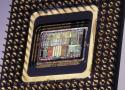
No more 486 support?! Don't come crying to me when your fancy pants speculative execution gets you into another security bind! Angrily shakes old man fist at clouds
That made me interested on the last in-order x86 CPU and it is Saltwell atom chips (which were a die-shrink of Bonnell) and some of these chips based on Saltwell were released as late as 2012(!) and they are even 64-bit.
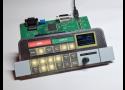
Royal McBee's desk-sized deskside early computer was the stuff of legend

This python program:
print(‘’.join([f’{xint:0{5}b}’ for xint in range(32)]))will output this string :
0000000001000100001100100001010011000111010000100101010010110110001101011100111110000100011001010011101001010110110101111100011001110101101111100111011111011111
Ask any purported “AGI” this simple IQ test question:
“What is the shortest python program you can come up with that outputs that string?”
Scientific induction is all about such algorithmic simplification under Algorithmic Information Theory:
The rigorous formalization of Occam’s Razor.
If an “AGI” can’t do scientific induction on even so trivial a scale, why attribute “general intelligence” to it?
This isn’t to say such an AI isn’t in the offing in the foreseeable future, but let’s be realistic about how we go about measuring the general intelligence of such systems.
This note describes XyWrite III+ in some detail, with emphasis on (a) its overall architecture and on "internals," and (b) its "macro"/programming/automation facilities. The target audience is threefold: (1) XyWrite III+ users who want more understanding, mostly of XyWrite XPL programming, (2) others who have never used XyWrite, and "wonder what the fuss is/was all about," and (3) myself -- since nothing clarifies one's thoughts about a given topic as trying to explain the topic to someone else. //
XyWrite III+ is a product that many users still feel is the best writing tool they have ever experienced. But, due to some misestimation by XyQuest (XyWrite's developer) as to how much MS Windows would damage the DOS applications market, plus an untimely, misguided, and costly partnership between XyQuest and IBM at about the time Windows was emerging, XyQuest failed at about the time MS Windows emerged. XyWrite development largely ceased soon thereafter.
In my view, many of the concepts that made XyWrite great have never been articulated, and many of them died when XyQuest died. This note attempts to explore and lay out some of those concepts, in a way that they might be appreciated even by someone who has never used the product, in the hope that some of these concepts might emerge in some measure in future "word processing" software. This hope, however, is perhaps a rather slim one -- nothing will make a person into a XyWrite fan as much as actually using the product will.
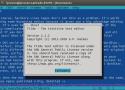
Tilde is a plain text editor for the Linux console. The difference is that even if you've never seen it before, you already know how to use this one. //
In the bad old days of WordStar, WordPerfect, DisplayWrite, MultiMate, Arnor Protext and so on, every app had a totally different UI.
This was partly because they all came from different original platforms, partly because such things weren't standardised yet, and partly because once someone had mastered one company's program, it made them very reluctant to switch to anything else. WordStar, for instance, offered original WordStar, WordStar 2000 and WordStar Express, all with totally different UIs.
But then the Mac came along. All its apps looked and worked much the same, because in 1987, Apple published a big, detailed book [PDF] telling programmers exactly how MacOS UIs should work. IBM followed suit with its CUA standard and gradually PC apps fell in line.
Windows and OS/2 both followed CUA, as did Motif on UNIX, and for a few decades harmony mostly reigned. GNOME 3 threw a lot of this out of the window, but even now most Linux graphical desktop and apps broadly follow the system: a menu bar, with File and usually Edit menus, a Help menu at the end, Ctrl+S to save, Ctrl+O to open, and so on. You may never have heard of CUA, but you know how to use it. //
Intel i7-5600U vs i5-8350U vs i5-8265U vs i7-8650U

Unix introduced / as the directory separator sometime around 1970. I don't know why exactly this character was chosen; the ancestor system Multics used >, but the designers of Unix had already used > together with < for redirection in the shell (see Why is the root directory denoted by a / sign?).
MS-DOS 2.0 introduced \ as the directory separator in the early 1980s. The reason / was not used is that MS-DOS 1.0 (which did not support directories at all) was already using / to introduce command-line options. It probably took this usage of / from VMS (which had a more complicated syntax for directories). You can read a more detailed explanation of why that choice was made on Larry Osterman's blog. MS-DOS even briefly had an option to change the option character to - and the directory separator to /, but it didn't stick.
/ it is recognized by most programmer-level APIs (in all versions of DOS and Windows). So you can often, but not always get away with using / as a directory separator under Windows. A notable exception is that you can't use / as a separator after the \\? prefix which (even in Windows 7) is the only way to specify a path using Unicode or containing more than 260 characters.
Some user interface elements support / as a directory separator under Windows, but not all. Some programs just pass filenames through to the underlying API, so they support / and \ indifferently. In the command interpreter (in command.com or cmd), you can use / in many cases, but not always; this is partly dependent on the version of Windows (for example, cd /windows works in XP and 7 but did not in Windows 9x). The Explorer path entry box accepts / (at least from XP up; probably because it also accepts URLs). On the other hand, the standard file open dialog rejects slashes. //
The underlying Windows API can accept either the backslash or slash to separate directory and file components of a path, but the Microsoft convention is to use a backslash, and APIs that return paths put backslash in.

MS-DOS and derived systems use backslash \ for path separator and slash / for command parameters. Unix and a number of other systems used slash / for paths and backslash \ for escaping special characters. And to this day this discrepancy causes countless woes to people working on cross-compilers, cross-platform tools, things that have to take network paths or URLs as well as file paths, and other stuff that you'd never imagine to suffer from this.
Why? What are the origins of this difference? Who's to blame and what's their excuse?
Why does Windows use backslashes for paths and Unix forward slashes?
– phuclv Commented Aug 13, 2018 at 16:55While your question is perfectly reasonable, your phrasing seems to imply that you think the UNIX approach was already a de facto standard and MS-DOS was unique in deviating from it. See, as a counter-example, how the Macintosh OS used
:as its path separator until MacOS X introduced POSIX APIs. This question goes into the history of that decision and answers point to:and.as path separators predating UNIX's use of/.
– ssokolow Commented Aug 1, 2022 at 20:10@ssokolow UNIX was there with its forward slashes long before MacOS and DOS were created.
– SF. CommentedAug 2, 2022 at 8:13@SF. And, as the answer phuclv linked says, DOS got it from CP/M, which got it from VMS. I don't know why VMS chose
\when UNIX chose/seven years before VMS's first release (going by Wikipedia dates), but it wasn't a settled thing. Other designs were using:and.in the mid-60s, half a decade before UNIX decided on/, and UNIX broke from Multics's>because they wanted to use it for shell piping.
– ssokolow Commented Aug 3, 2022 at 5:31Use of UNIX back then wasn't nearly as ubiquitous as it is today. Almost all of industry and many schools used manufacturer-written and -supplied operating systems, especially from DEC. And within the more well-known CS schools (not that it was called "CS" then) there was also a lot of use of homegrown OSes. So the influence of UNIX wasn't as pronounced as it is today, as well - that took many years to develop.
– davidbak Commented Aug 3, 2022 at 16:51
A:
PC/MS-DOS 1 used the slash (/) as the command line switch indicator (like DEC's RSX11 and DG's RTOS before), so when DOS 2.0 introduced subdirectories, they did need a new one. Backslash () came somewhat natural - at least on US keyboards.
With 2.0 IBM/Microsoft also tried to reverse that decision and introduce a syscall (INT 21h function 3700h and 3701h) and a CONFIG.SYS option (SWITCHAR=) to set a different switch indicator. All manufacturer supplied commands would obey that new char. Set to a hyphen (-) would make the syntax more like Unix.
In fact, in paths, the OS didn't care. All dedicated path names, like in syscalls, can be written with either slash. It's only within the command line scan of each command, that simple slashes get interpreted as switch indicators. The idea was that people could/should migrate to a Unix-like style, but that didn't catch on.
With DOS 3.0 the SWITCHAR= option got removed fom CONFIG.SYS, but the syscalls are still availabe up to today. //
A:
The README.txt file in the MS-DOS 2.0 source code, which was apparently intended to guide OEMs on how to build custom DOS builds for their hardware, indicates that the decision to use backslash was requested by IBM: Microsoft had been originally intending to use forward slash, and the change happened late in the development process. This is probably why the kernel ended up supporting the use of either character -- it was, presumably, too late to change over fully.
The user manual contains some significant errors. Most of these are due to last minute changes to achieve a greater degree of compatibility with IBM's implementation of MS-DOS (PC DOS). This includes the use of "\" instead of "/" as the path separator, and "/" instead of "-" as the switch character.
This is true, but very widely misinterpreted – the forward slash as an option character did not come from IBM, IBM's own operating systems (mainframe and minicomputer) never used that syntax. What IBM objected to, was Microsoft's proposal in DOS 2.0 to change it from slash to dash – IBM cared about backward compatibility. But IBM wouldn't have had a problem if Microsoft had made it dash all along, starting with DOS 1.0; IBM didn't care what the syntax was in the initial version, but they didn't want it changed in a subsequent.
– Simon Kissane Commented May 26, 2023 at 1:47
Jeremy Keeshin
@jkeesh
In 1945, six women pulled off a computing miracle.
They programmed the world’s first computer—with no manuals, no training.
Then, a SINGLE assumption erased them from tech history for decades.
The story of how ONE photo nearly deleted computing’s female founders: 🧵
Kathy Kleiman, a young programmer, found old photos of women standing beside ENIAC—the first general-purpose computer.
When she asked who they were, curators said: “Probably just models”...
But Kleiman had a feeling they were something more:
Program ENIAC—a machine the world had never seen.
It was 8 feet tall, 80 feet long, and weighed over 60,000 pounds.
The engineers built the hardware...
But someone had to figure out how to make it do anything:
They were the world’s first programmers.
First, they were hired as “human computers” to calculate missile trajectories during WWII.
Then chosen for a top-secret project unlike anything before:
Security restrictions kept them out of the ENIAC lab.
They had to write programs using only blueprints and logic diagrams.
No manuals. No programming languages...
So how do you code something no one’s ever coded before?
By inventing the process from scratch.
They built algorithms, flowcharts, and step-by-step routines—on paper.
Then, once granted access, they programmed ENIAC by physically rewiring it...
And that’s where things got even harder:
There was no keyboard.
Programming meant plugging thousands of cables into the right configuration—by hand.
It was almost impossible to program.
But they pulled it off anyway:
On this day in 1975, Bill Gates and Paul Allen founded a company called Micro-Soft in Albuquerque, New Mexico.
then write up the marketing letter, format it and let it all rip on a Diablo 630 daisy wheel printer. Many, was that thing loud. Made the whole office grimace when I kicked it off. //
Re: Loud printers
You've obviously never used an ICL 1900 lineprinter: these could print at 160 characters per line at up to 1300 lines per minute. The mechanism was based round a hollow drum the full width of the paper with 160 rings of characters, each containing the complete character set. These were organised so that each embossed row had the same character in every position. The embossed drum was installed behind a row of 160 hammers and a inky ribbon the full width of the paper: both paper and ribbon scrolled vertically, though not at the same speed. The print hammers were driven off a very latge capacitor in the printer's body.
The printer was loud enough when printing invoices, etc, but George 3's print driver could easily outdo it. It separated documents by outputting, IIRC, a page throw, a job title, 10 full width lines of 160 asterisks and another page throw: when this happened the printer almost jumped off the floor and made a noise similar to a short burst from a machine gun.
These ICL printers were much louder than any IBM lineprinter I've ever heard running. That's because IBM used train printers: the character set formed a rotating chain running across the paper path and were designed so that only one character could hit the paper at a time. //
Re: Loud printers
Impact printers were getting fairly close to their practical limits in terms of printing speed. There was a flurry of development in the early 1970s to come up with better solutions. Xerox produced something that was kind of a hybrid between a drum printer and a photocopier - a set of flash lamps illuminated the correct characters on a drum transferring their images optically to the selenium copier drum. That got printing up to around 4000 lines a minute. Honeywell introduced an electrostatic system using a dielectric paper that raised speeds to 18,000 lines per minute.
However, it was IBM that developed the first laser printer - the IBM 3800. Its initial version managed only a shade under 14,000 lines per minute, but a later version raised the speed to over 20,000 lines per minute - around 2.8 km/h. With paper running that fast , a laser and a hot fuser unit, suddenly noise was not the only hazard. There's a fascinating training video for operators that shows the massive scale of the beast.